








Contributors: Prajeesh Sureshkumar & Niranjan Jayanand
Introduction
Silent Subject Campaigns, also known as Null Subject/Empty Subject campaigns are a lure phishing campaign or scam tactic where emails are sent without a subject line or with an extremely vague subject line. This is designed to encourage users to open the email out of curiosity, confusion, or a false sense of urgency.
The primary objective of a Silent Subject Campaign is to gain initial access through social engineering, leading to credential compromise, unauthorized access, and potential lateral movement within targeted environments, especially focusing on high-value or VIP users.
Cyberproof Threat Hunting and Managed Detection & Response Teams detected a widespread Null Subject phishing campaign targeting VIP users across multiple organizations from multiple sender domains.
What’s fueling the growing use in Phishing attacks?
There are a number of reasons why this approach is gaining traction with attackers, including:
- It bypasses email security filters
Empty subject emails can help attackers evade email security filters, as many detection mechanisms rely partially on analyzing the subject lines especially looking for keywords like (urgent, invoice, reset password, Action Required etc). These are known phishing patterns which bypass all Keyword-Based Rules and are not blocked so may be intentionally used for malicious intent.
Empty subject emails reduce content for analysis as they have no subject, which means less data to scan, reducing the chance of detection. Null subject emails also evade signature- based detections on email gateways for known phishing templates. Without a subject line, the email doesn’t fully match known signatures. It also weakens heuristic and Machine Learning models as many detection engines use; “Subject + body + sender” reputation for email analysis, Removing the subject lowers the overall risk score. While removing the subject line reduces the chance of being detected, it does nothing to reduce the success of the attack, as the malicious content will continue to be placed in the body of the email. There is a high chance that the email will be flagged as safe, while malicious QR codes (quishing) or malicious links can still be included within.
Figure 1: Sample listing of empty subject emails from multiple senders - It evades user suspicion
Emails with empty subject lines evade user suspicion by exploiting human curiosity. End-users naturally wonder: “Why is this email blank?”, “what is in it?” This increases open rates, especially among VIP users and busy executives who open a high quantity of emails at a regular cadence throughout the day. There are also many valid reasons why an email may not have a subject line included, which makes these emails less likely to fall under immediate suspicion.
Figure 2: Sample preview of an empty subject phishing mail - It helps attackers manage campaign variability
Attackers can send emails from multiple domains with different payloads, and by keeping subject lines empty they ensure consistent evasion across variations in campaigns, increase the likelihood of user interaction.

![Screenshot of an email with a PDF attachment and a warning in red text: "[EXTERNAL EMAIL] For email security, do not click any links or open attachments unless you trust the sender—silent lures like empty subject email attacks are common.](https://www.cyberproof.com/wp-content/uploads/2026/04/image-11.png)
Attack Overview
This campaign leveraged multiple spoofed or compromised sender domains and includes malicious links, quishing and RMM tools. These redirect users to credential harvesting pages and malware delivery sites and abuse legitimate RMM tools or services to blend in with normal activity and avoid raising suspicion. A typical campaign is shown below.
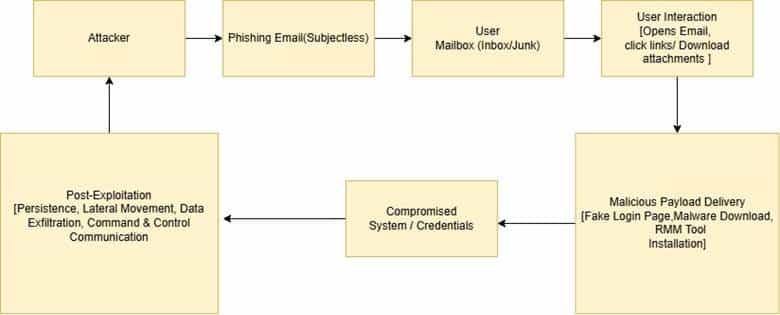
Figure 3: Attack flow chart
In Null Subject phishing campaigns, attackers increasingly use QR codes as a primary delivery mechanism to evade detection and enhance user interaction. Inside the email, a QR code is embedded as an image, often accompanied by minimal or urgent instructions such as requesting account verification, document access, or security updates. As QR codes are image based, many security solutions cannot easily inspect or decode the embedded link or the QR code’s content. This allows malicious URLs to bypass standard scanning mechanisms. When users scan the QR code using their mobile devices they are redirected to attacker-controlled phishing websites. These may simulate a legitimate vendor site, but contain credential harvesting pages or malware downloads, or they may immediately proceed with installation of remote management tools (RMMs) for persistent access.
This technique also shifts the attack from a monitored corporate environment to a personal mobile device, further reducing visibility for security teams. Attackers often rotate the domains and payloads behind the QR codes, making the campaign more resilient and difficult to block.
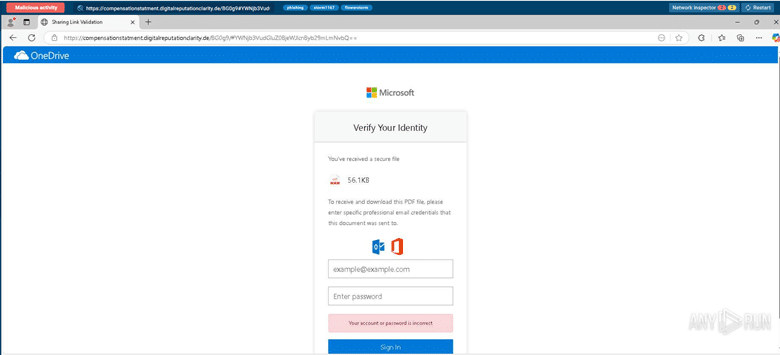
Figure 4: Depicts the fake Microsoft login page (destination of Quishing)
During the investigation, CyberProof identified multiple shortened URLs that ultimately redirected to phishing pages. The use of these redirect chains enables attackers to obscure the final destination and bypass URL-based detection controls. If a user interacts with these links, it can lead to credential compromise. Another notable aspect of this campaign investigation was the wide use of Datto RMM, which is a legitimate tool used by IT teams and MSPs to monitor endpoints, deploy software, run scripts remotely and manage devices across networks.
In this case, attackers are using Datto RMM to gain remote access to compromised systems, establish persistence, and move laterally across the network. They were able to execute commands, including deploying malware or ransomware, monitor user activity, and exfiltrate sensitive data, all while blending in with normal IT operations to reduce the likelihood of detection.
This specific version of Datto RMM, named PlayVoiceMail[dot]exe (d8058be4e9254621662af89d3e11fac63335052b352c177278209a466caca40f) has been detected in emails, sent from multiple sender domains during the campaign.
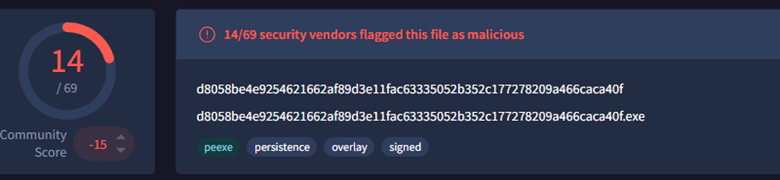
Figure 5: Depicts VT detection of Datto RMM named as PlayVoiceMail[.]exe
Additionally, another version of Datto RMM named statement[.]exe (5fdb51f73fec1a08f3b791262236152ea7c762e5cb3ae5418a5353909fbd6781) has also been seen, delivered as direct attachments and through redirects from PDF attachments.
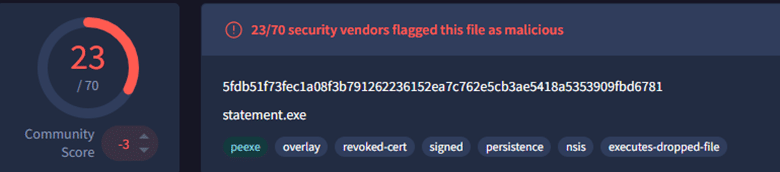
Figure 6: Depicts VT detection of Datto RMM named as statement[.]exe
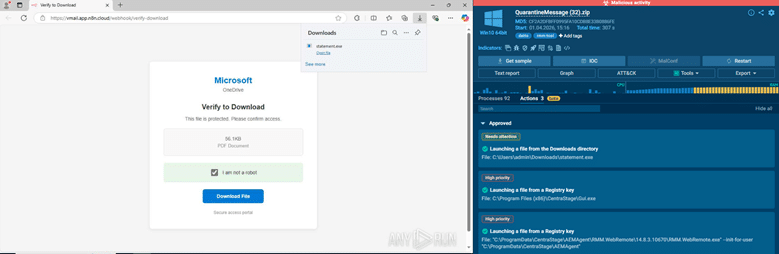
Figure 7: Depicts the Datto RMM file statement[.]exe in sandboxed environment, downloaded from Microsoft themed phishing page
One toolkit seen during this campaign investigation is a Microsoft 365 phishing-as-a-service (PhaaS) platform called “FlowerStorm”. This is a modern, large-scale phishing campaign toolkit known for using evasive delivery techniques and multi-stage attack chains to compromise users, requiring minimal technical expertise and often targeting enterprise environments and high-value individuals.
During the investigation, it was observed that the same sender was delivering quishing attacks which redirect to different destinations, as well as multiple malware variants within the same timeframe to various recipients. This behavior indicates that the attacker is using automation to run a faster, large-scale campaign with continuously changing attack methods, making detection and response more challenging. The SOC cannot analyze one email and identify the malicious destination or content for the entire campaign, instead every email must be analyzed individually.
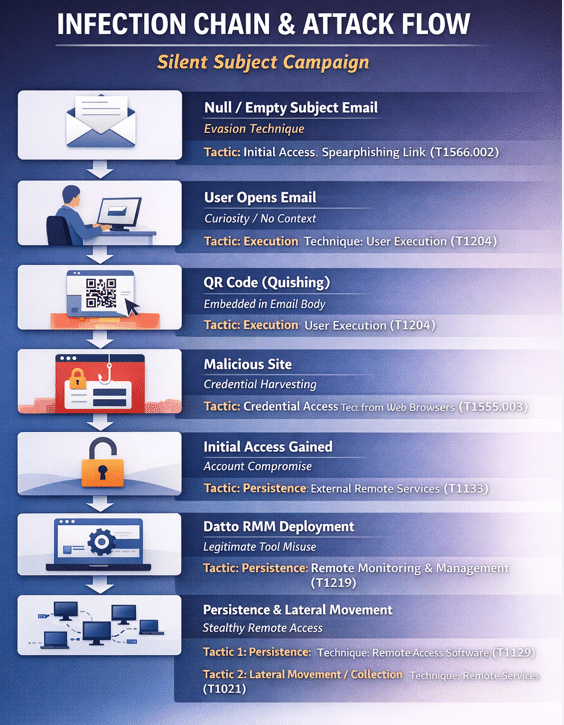
Figure 8: Depicts the infection chain and attack flow of silent subject campaign
How prominent are these kinds of Null Subject attacks?
During Q1 of 2026, the CyberProof Threat Hunting team observed a significant increase in Null Subject phishing campaigns targeting enterprise users, especially those targeting VIPs. The rise in such campaigns indicates a growing trend in sophisticated social engineering tactics, leveraging both technical evasion mechanisms and psychological triggers to compromise user accounts and endpoints. This surge highlights the need for increased awareness, proactive monitoring, and strengthened email security measures across the enterprise.
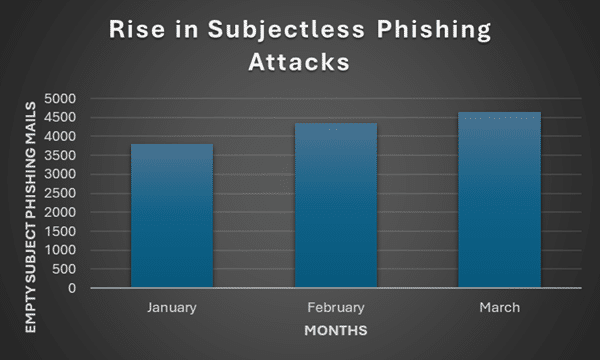
Figure 9: Depicts the Rise in Subject less Phishing campaign Q1,2026
CyberProof analysis for Empty/Null Subject phishing campaigns observed a steady upward trend in activity over Q1 2026. From January to February, there was a significant increase of 13.9%, suggesting a rapid expansion in campaign distribution. This was followed by a continued rise of 7.0% from February to March, indicating sustained attacker activity. From this data, we would expect to see growth of approximately 9.8% during the period March to April.

Figure 10: Depicts the expected Rise in Subject less Phishing campaigns
Indicators of Compromise
Below are the main IOCs which were observed to be part of Null Subject campaign investigations:
- d8058be4e9254621662af89d3e11fac63335052b352c177278209a466caca40f
- 5fdb51f73fec1a08f3b791262236152ea7c762e5cb3ae5418a5353909fbd6781
- hxxps://2no.co/bLUlkQxogBKTJPT[.]pdf
- julyservices[.]com
- shoppingtrends[.]in
- compensationstatment[.]digitalreputationclarity[.]de
- institutionperformanceportfoliostatement[.]digitalreputationclarity[.]de
- digitalreputationclarity[.]de
- vfgbhuytyr5fdg-1388504898.cos.na-siliconvalley[.]myqcloud[.]com
- vmail[.]app[.]n8n[.]cloud
- edocsis[.]com
- tanadgusixcorporationusa[.]credlyxi[.]cfd
- credlyxi[.]cfd
- 9091041088fsdoxlinsw[.]solidenginecorp[.]cfd
- solidenginecorp[.]cfd
- canadaonline-cialis[.]net
- 2no[.]co
- cjs[.]co[.]th
- infra.infratechcorpsolutionllp[.]com
- infratechcorpsolutionllp[.]com
- tracking[.]us[.]nylas[.]com
- www-0159[.]com
- ed[.]tc
- mmgprocurement[.]com
- gamblingprice[.]com
- 2plus2equal5[.]com
- radar.a-reda[.]com
- casinojudiadvisor[.]net
- aquapass[.]net
- secure.ppi98pasirjeungjing[.]org
- jabariinterfreight[.]com
- waterpowerinn[.]com[.]ar nwcloudcallvm[.]digitalreputationclarity[.]de
Recommendations
Null subject phishing campaigns are critical to monitor because they specifically target high-value users such as executives and VIPs. Although the majority of emails may be detected and quarantined by email gateways, even a single successfully delivered malicious email can exploit user curiosity and lead to credential compromise. Given the elevated privileges of these users, a successful attack can result in significant organizational impact, including financial loss, data breaches, and business email compromise.
Recommendations to share with your business include:
- Always verify the sender: Check the full sender email address (not just the display name) for inconsistencies or potential spoofing.
- Avoid opening unexpected attachments: Avoid opening attachments from unknown or external senders, as they may contain malware.
- Enable Multi-Factor Authentication (MFA): MFA adds an extra layer of protection even if credentials are compromised.
- Report suspicious emails immediately: Report suspicious emails via your organization’s reporting mechanism or notify the IT/security team.
- Educate for employee awareness: Conduct regular security awareness training sessions to educate end users on evolving phishing tactics. Specifically warn them to be cautious of empty-subject emails, even if they appear to come from known or trusted sources.
- Implement advanced email filtering: Implement robust security solutions that can analyze email body content and attachment behavior rather than relying on subject lines alone.
Silent Subject Campaigns represent a shift toward stealth-focused phishing operations, where attackers prioritize evasion and behavioral manipulation over traditional lure techniques. By combining null subject emails, QR-based payload delivery, and legitimate tool abuse, this campaign demonstrates how modern phishing attacks are becoming more adaptive, persistent, and difficult to detect.
