








Contributors: Naveen Chenna, Vishak Unnikrishnan Kavitha, Niranjan Jayanand
Introduction
During the first half of 2026 (H1 2026), CyberProof Threat Researchers identified multiple malicious campaigns leveraging Microsoft Teams as an initial access vector. These intrusions incorporated a variety of remote management tools within the attack chain. On average, during these voice phishing (vishing) attacks, threat actors remained on a live call with the target for approximately 20 minutes to establish trust and secure remote access.
These incidents underscore the critical importance of context-driven threat hunting, particularly for detecting hands-on-keyboard activity that frequently evades traditional Endpoint Detection and Response (EDR) alerts. Without deep behavioral visibility, Managed Detection and Response (MDR) teams can face significant blind spots. Consequently, proactive threat hunting is essential to identify and disrupt these attacks at an early stage.
This blog post analyzes two specific incidents where CyberProof’s MDR, Threat Intelligence, Threat Hunting, and Detection Engineering teams collaborated closely to protect global organizations from catastrophic damage. While federal and private sector intelligence (including the FBI and Google) recently issued alerts regarding Silent Ransom Group vishing campaigns, at time of publishing our investigative findings could not definitively link the incidents detailed here to that group.
Technical Analysis
CyberProof researchers, alongside the broader cybersecurity community, have observed both financially motivated threat actors and Iranian state-aligned groups actively abusing Microsoft Teams’ external access features to gain initial footholds in enterprise networks.
In these campaigns, attackers typically impersonate internal IT help desk personnel, combining phishing and vishing techniques to establish rapport with targeted users. Throughout H1 2026, CyberProof observed multiple client incidents involving diverse payloads—such as SINDOOR—alongside the deployment of various remote management tools across the broader attack chain.
Learn more about those previously observed incidents:
- Breaking Down Black Basta’s Advanced Phishing Strategies
- Teams Social Engineering Attack: Threat Actors Impersonate IT to Steal Credentials via Quick Assist
- Iranian APT Seedworm Targets Global Organizations via Microsoft Teams
- Microsoft Blog on Cross tenant attack
Case Study #1: 23-Minute Voice Phishing Over Microsoft Teams
In this specific intrusion, CyberProof analysts discovered that the threat actor maintained an active call with the target for approximately 23 minutes. The attacker initiated contact via Microsoft Teams chat, masquerading as an IT support representative, and subsequently launched a call from a fraudulent external Microsoft tenant account: corporate@helpdeskwindowsfamily.onmicrosoft.com.
- Call Join Time: 3/21/2026, 1:28:31.000 AM
- Call End Time: 3/21/2026, 1:51:35.000 AM

Figure 1: Microsoft Teams log showing attacker in action
After successfully gaining the user’s trust, the attacker dropped TeamViewer onto the endpoint and initiated hands-on-keyboard activity via cmd.exe, as detailed below.
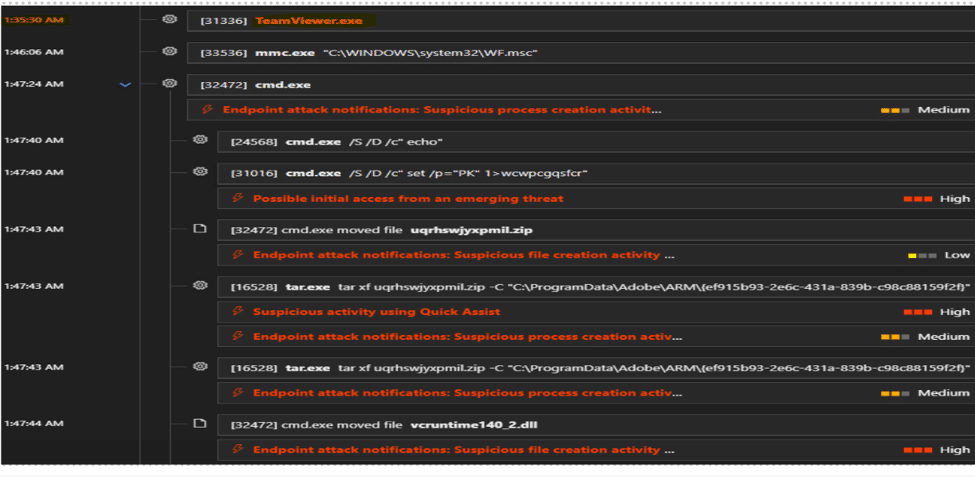
Figure 2: Attacker deployed TeamViewer and executed hands-on-keyboard activities.
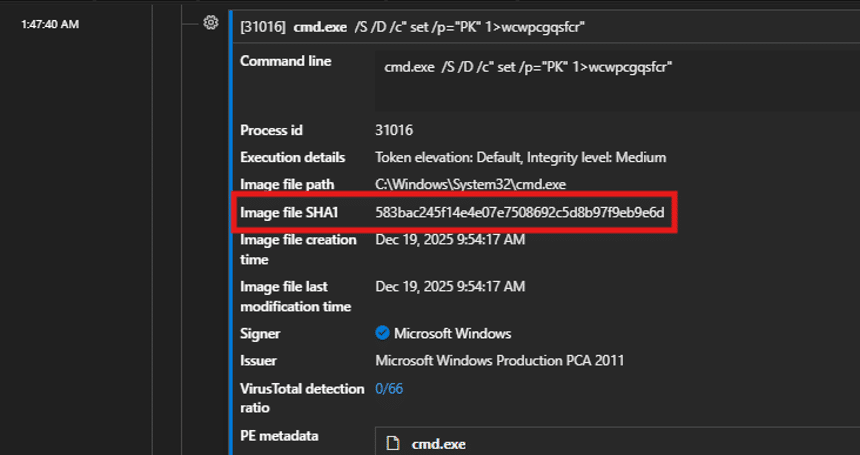
Figure 3: cmd.exe utilized to spawn commands for hands-on-keyboard operations.
Once remote access was established, the attacker enumerated target files, archived them, and prepared the data for staging and exfiltration.

Figure 4: Attacker staging and archiving files of interest.
CyberProof researchers successfully intervened and blocked the attack sequence when the threat actor attempted to drop a file (MD5: 00f30fd0cefa93b8070d32b141d85e58) associated with Steam Desktop Recording. Security analysts believe the attacker intended to use this utility to record their own malicious activities on the machine.
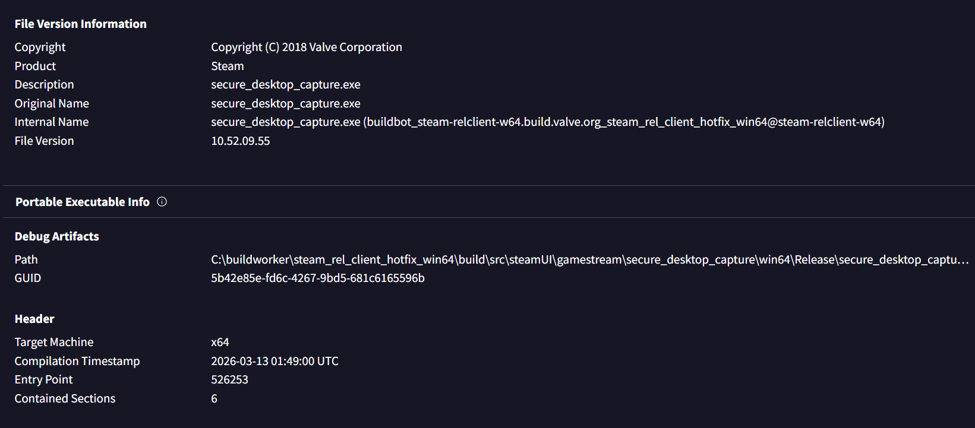
Figure 5: File properties of the dropped Steam screen capture utility.
Case Study #2: Multi-Employee Targeting in Healthcare
In late January 2026, CyberProof MDR analysts and threat hunters identified a vishing actor targeting multiple employees at a healthcare organization. Operating via Microsoft Teams external access, the attacker impersonated help desk staff.
By exploiting the platform’s cross-tenant external call features, the attacker managed to compromise a high-value target. The employee accepted the call because the incoming caller ID appeared as “Help Desk.” The attacker convincingly argued that the user’s “machine was infected with a virus” and persuaded them to launch a remote support session using Windows Quick Assist. Evidence suggests the attacker possessed prior knowledge that Quick Assist was the trusted, pre-installed remote monitoring and management (RMM) tool within the target organization.
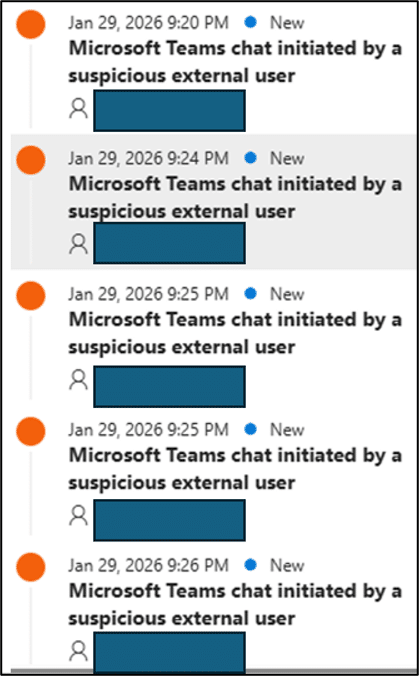
Figure 6: Attacker initiating simultaneous Teams chats to five different employees.

Figure 7: Microsoft Teams interface displaying the attacker’s spoofed “Help Desk (External)” identity.
After establishing the remote session, the attacker executed a malicious PowerShell script designed to perform the following actions:
- Query Active Directory (AD) for user accounts featuring Service Principal Names (SPNs).
- Request Kerberos service tickets for those identified SPNs.
- Format the extracted data into a
$krb5tgs$23$hash string (Kerberoasting). - Print the output, write the formatted hashes to a plain text file (
New text document.txt), and attempt data exfiltration viasendspace.com.
Threat Hunting Queries
1. Detect cmd.exe Execution with Suspicious Flags
Code snippet
// Query to check for cmd.exe execution with suspicious flags
DeviceProcessEvents
| where Timestamp > ago(7d)
| where InitiatingProcessFileName =~ "cmd.exe"
| where FileName =~ "cmd.exe"
| where ProcessCommandLine has_all ("/S /D /c", "\" set /p=\"PK\"", "1>")
2. Detect IT Help Desk Impersonation on Teams
Code snippet
// Query to check for IT impersonation attacks
let LookBack = 1h; // Source: Steve Lim
CloudAppEvents
| where Timestamp > ago(LookBack)
| where ActionType == "TeamsImpersonationDetected"
| extend ImpersonationDisplayName = tostring(parse_json(tostring(RawEventData.Sender)).DisplayName)
| extend ImpersonationUPN = tostring(parse_json(tostring(RawEventData.Sender)).UPN)
| extend ImpactedUserUPN = tostring(RawEventData.UserId)
| where (tolower(ImpersonationDisplayName) matches regex @"(compliance|security|secops|help|desk|support|^tech|tech$|tech\s|assistance|troubleshoot|admin|^it|it$|it\s)"
     or tolower(ImpersonationUPN) matches regex @"(compliance|security|secops|help|desk|support|^tech|tech$|tech\s|assistance|troubleshoot|admin|^it|it$|it\s)")
| where ImpersonationUPN endswith ".onmicrosoft.com"
| project Timestamp, ImpactedUserUPN, ImpersonationDisplayName, ImpersonationUPN
3. Detect Outbound Connections to Known Exfiltration Platforms
Code snippet
// Query to check for possible outbound connections prior to data exfiltration (domains may vary)
CustomAuxCommonSecurityLog_CL
| where TimeGenerated > ago(1d)
| where DestinationHostName has "sendspace.com"
   or RequestURL has "sendspace.com"
   or DestinationDnsDomain has "sendspace.com"
| project
   TimeGenerated,
   DeviceProduct,
   SourceUserName,
   DestinationHostName,
   DestinationDnsDomain,
   RequestURL,
   DeviceAction,
   SentBytes,
   ReceivedBytes,
   AdditionalExtensions
| take 50
Indicators of Compromise (IoCs)
- MD5:
00f30fd0cefa93b8070d32b141d85e58 - SHA-1:
b3388fcc0e1407616df8ab6e65de1702624a1c1a - SHA-256:
3e1386ec203c15d13ebff8b5b6f644524e8aeed6c628d2e248e5c28c3218df3f
Defensive Recommendations for Microsoft 365 Environments
- Review External Collaboration Policies: Strictly regulate cross-tenant access and ensure that users receive prominent, unmissable “External Sender” notifications when messaging external contacts on Microsoft Teams. Implement identity- or device-based verification controls before permitting remote support interactions.
- Enable Network Protection: Configure endpoint policies to block command-and-control (C2) beaconing to low-reputation or newly registered domains. Implement real-time alerting for unauthorized registry modifications within Automated Startup Execution Points (ASEP) by non-installer processes. Custom detection rules tailored to your environment are vital for surfacing these hidden infrastructure threats.
- Enforce Strict Conditional Access: Mandate phishing-resistant Multi-Factor Authentication (MFA) and compliant device states for all administrative and high-value roles. Restrict Windows Remote Management (WinRM) exclusively to designated, authorized management workstations. Continuously monitor for unauthorized data synchronization tools and remote monitoring software through targeted threat hunting.
Conclusion
The security incidents analyzed above highlight how threat actors continuously evolve their social engineering tactics by exploiting trusted collaboration platforms like Microsoft Teams. By bypassing traditional security boundaries and manipulating users through multi-channel attacks (vishing combined with chat), adversaries successfully circumvent conventional controls. This makes proactive, behavioral-based threat hunting an indispensable tier of modern organizational defense.
CyberProof’s Advanced Threat Hunting services fuse next-generation detection engineering with deep analytical expertise to identify anomalous behaviors, map emerging adversary techniques, and coordinate rapid incident response. By maintaining continuous vigilance over early-stage indicators of compromise, CyberProof helps enterprises outpace threat actors, minimize operational risk, and harden their overall security architecture.
