







Contributors: Vishak Kavitha, Vinoop Chnadran
Executive Summary
CyberProof Managed Detection and Response (MDR) analysts recently investigated an alert involving a browser-downloaded software installer disguised as a free utility. Endpoint Detection and Response (EDR) flagged and removed the file within seconds of landing on disk, prior to execution. This analysis details the complete delivery chain, the precise stage of remediation, and the potential downstream impact had prevention failed.
This incident demonstrates a prevalent trend: attackers leveraging convincing landing pages, valid code-signing certificates, and server-side control. The initial executable performs minimal local decision-making; instead, it profiles the target host and queries a remote server to determine the second-stage payload dynamically.
The Delivery Chain
The attack relies on user interaction without exploiting software vulnerabilities. This delivery pattern is common across software bundlers and adware distribution networks:
- Step 1 – The Lure: The user navigates to a landing page offering a free utility or add-on. The site mimics a legitimate product portal with a call-to-action button (e.g., “Continue” or “Download”).
- Step 2 – The Download: Interaction triggers the download of an EV code-signed Windows executable to the host’s Downloads directory.
- Step 3 – Fingerprinting (Post-Execution): Upon execution, the installer gathers system telemetry, including OS build details, browser information, and IP address, generating a unique device fingerprint.
- Step 4 – Command and Control (Post-Execution): The file contacts operator-controlled infrastructure, transmitting device parameters and requesting instructions. The server responds with a runtime-selected link for a second-stage payload.
- Step 5 – Persistence by Design: Default configuration settings commonly attempt to extract browser data, establish startup persistence, and execute silently.
The Attack Chain
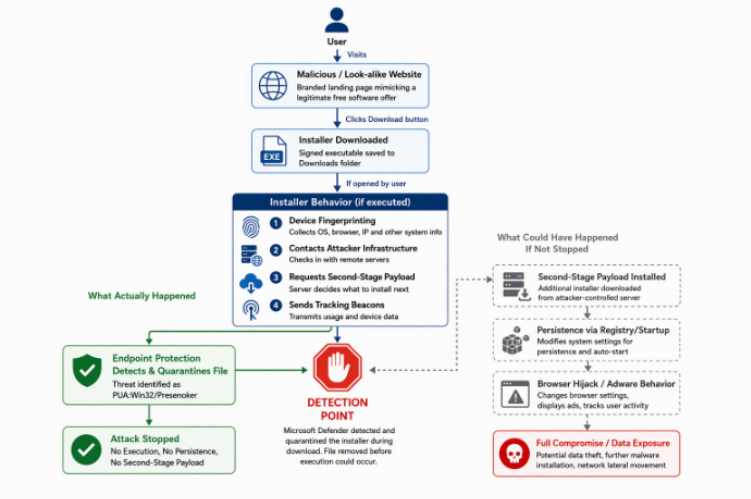
Figure 1: A typical unwanted-software delivery chain.
Detection: Scope of Reach and Containment Mechanics
Figure 1 above has initial events depicted in green, and potential post-execution outcomes depicted in grey and red. Understanding the extent of host exposure and the remediation mechanism is crucial for defenders. Analysis of incident telemetry yielded the following findings:
- Scope of Reach: The file successfully reached the endpoint, where it was downloaded and briefly written to disk within the user’s Downloads directory.
- Detection Mechanism: Endpoint protection inspected the payload inline during the active web download—rather than post-execution or via scheduled disk scans—classifying it as a Potentially Unwanted Application (PUA).
- Containment & Remediation: EDR quarantined and removed the executable within seconds of disk write, neutralizing the threat before any user interaction could occur.
- Verification: Telemetry confirms zero execution artifacts. No child processes were spawned, no outbound network connections were initiated by the payload, and no registry key or scheduled task modifications occurred. Containment succeeded at Step 2 of the delivery chain, preventing device fingerprinting and command-and-control (C2) check-in.
Hypothesized Post-Execution Impact
Had the download-stage prevention failed and user execution occurred, this category of installer typically follows a standardized execution path:
- Step 6 – C2 Check-In: The installer profiles host system metadata and checks in with remote vendor/operator infrastructure to report installation telemetry and request further instructions.
- Step 7 – Second-Stage Payload Acquisition: The C2 server selects and delivers a secondary executable at runtime, meaning the final payload is dynamically determined by the operator rather than static within the initial binary.
- Step 8 – Persistence Establishment: System settings, such as registry autostart entries, are configured to maintain persistent access across system reboots.
- Step 9 – Browser Hijacking & Tracking: Browser configurations are altered to inject unauthorized advertisements, perform search redirects, and track user activity—standard monetization tactics for adware/PUA operations.
- Step 10 – Downstream Organizational Impact: Depending on the nature of the server-served second-stage payload, impacts can range from persistent system performance degradation to credential harvesting and lateral malware propagation, leaving security teams with zero visibility or control over payload selection.
Supporting Evidence
Multi-engine reputation analysis yielded a low detection ratio across scanning engines. This is typical for PUA and adware variants, as security vendors infrequently flag these categories with the same aggressiveness as conventional malware:
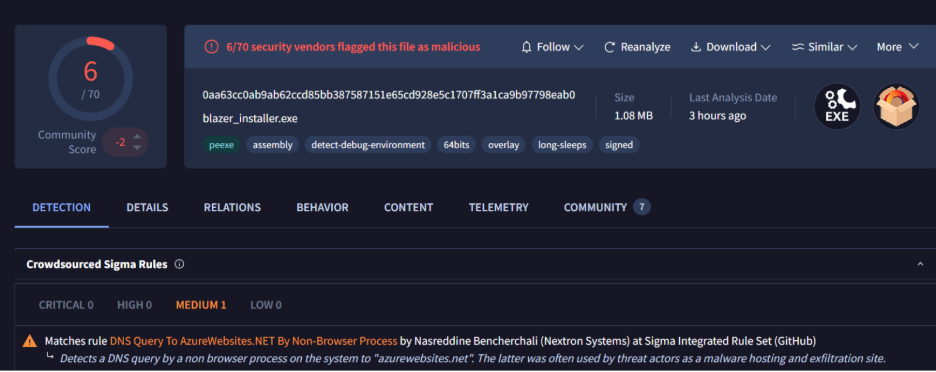
Figure 2: Multi-engine file reputation results illustrating a minimal detection ratio characteristic of PUA/adware binaries.
Endpoint detection logs confirm successful inline quarantine and incident resolution directly on the targeted host:

Figure 3: Endpoint log detail confirming payload quarantine and status marked as Prevented and Resolved.
Indicators of Compromise (IOCs)
| Artifact Category | Technical Indicator |
| Delivery Pattern | Newly registered or low-reputation domain hosting software downloads |
| File Format | Signed .NET/Windows GUI executable (EV code-signed) |
| Detection Name | PUA (Potentially Unwanted Application) |
| Detection Ratio | ~5–10% across multi-engine reputation platforms |
| Persistence Artifacts | Registry modification under HKCU\Software\<Vendor> (if executed) |
| C2 Telemetry | Outbound HTTPS requests to vendor APIs for metadata and payload retrieval (if executed) |
MITRE ATT&CK Mapping
| Tactic | Technique ID & Title |
| Initial Access | T1189 – Drive-by Compromise |
| Execution | T1204.002 – User Execution: Malicious File |
| Discovery | T1082 – System Information Discovery |
| Command & Control | T1071.001 – Application Layer Protocol: Web Protocols |
| Command & Control | T1105 – Ingress Tool Transfer |
| Persistence | T1547.001 – Registry Run Keys / Startup Folder |
| Defense Evasion | T1553.002 – Subvert Trust Controls: Code Signing |
Security Recommendations
The threat model associated with signed installers serving dynamic remote payloads warrants implementing the following proactive controls:
- Enforce Download-Stage Prevention: Verify that real-time, cloud-delivered endpoint protection is active across all hosts so that incoming binaries are evaluated prior to execution rather than during scheduled scans.
- Implement Secure Web Gateway Filtering: Block access to newly registered domains (NRDs) and low-reputation sites at the proxy or web filter layer, targeting portals distributing unauthorized browser extensions, utilities, or system optimizers.
- Investigate Low-Severity Verdicts: Avoid auto-dismissing lower-severity PUA alerts. Threat actors frequently reuse signed installer frameworks and dynamic C2 check-in mechanisms to deliver high-severity malware.
- Conduct User Security Awareness Training: Educate personnel regarding the risks of downloading free utilities from third-party sites, highlighting that valid digital signatures do not guarantee software safety.
- Execute Environment-Wide Threat Hunting: Proactively search telemetry for matching file hashes, code-signing identities, and delivery domains to identify potential execution instances across other enterprise endpoints.
- Perform Post-Execution Validation: If an installer executes before containment, inspect the target host for newly created registry
Runkeys, unauthorized scheduled tasks, and unexpected outbound HTTPS telemetry.
Hunting Queries
KQL:
let BrowserPaths = dynamic([
@”c:\\program files\\google\\chrome\\application\\chrome.exe”,
@”c:\\program files (x86)\\google\\chrome\\application\\chrome.exe”,
@”c:\\program files\\mozilla firefox\\firefox.exe”,
@”c:\\program files (x86)\\mozilla firefox\\firefox.exe”,
@”c:\\program files (x86)\\internet explorer\\iexplore.exe”,
@”c:\\program files\\internet explorer\\iexplore.exe”,
@”c:\\program files (x86)\\microsoft\\edge\\application\\msedge.exe”,
@”c:\\program files\\microsoft\\edge\\application\\msedge.exe”
]);
let BrowserPathPrefixes = dynamic([
@”c:\\program files (x86)\\microsoft\\edgewebview\\application\\”,
@”c:\\program files (x86)\\microsoft\\edgecore\\”,
@”c:\\program files\\microsoft\\edgecore\\”,
@”c:\\program files\\bravesoftware\\”,
@”c:\\program files\\seamonkey\\”,
@”c:\\program files (x86)\\seamonkey\\”,
@”c:\\program files\\naver\\naver whale\\”,
@”c:\\program files (x86)\\naver\\naver whale\\”,
@”c:\\program files\\waterfox\\”,
@”c:\\program files (x86)\\waterfox\\”,
@”c:\\program files\\slimbrowser\\”,
@”c:\\program files (x86)\\slimbrowser\\”,
@”c:\\program files\\falkon\\”,
@”c:\\program files (x86)\\falkon\\”,
@”c:\\program files (x86)\\avant browser\\”,
@”c:\\program files\\avant browser\\”,
@”\\tor browser\\”
]);
let BrowserPathContains = dynamic([
@”\\appdata\\local\\maxthon\\”,
@”\\appdata\\local\\programs\\opera\\”,
@”\\appdata\\local\\vivaldi\\”,
@”\\appdata\\local\\programs\\midori-ng\\”,
@”\\appdata\\local\\flock\\”,
@”\\appdata\\local\\phoebe\\”
]);
let BrowserFileNames = dynamic([
“safari.exe”,”brave.exe”,”maxthon.exe”,”opera.exe”,”seamonkey.exe”,
“vivaldi.exe”,”whale.exe”,”waterfox.exe”,”midori next generation.exe”,
“slimbrowser.exe”,”flock.exe”,”phoebe.exe”,”falkon.exe”,”avant.exe”,
“msedge.exe”,”msedgewebview2.exe”,”microsoftedge.exe”,
“msmpeng.exe”,”mssense.exe”
]);
DeviceEvents
| where Timestamp > ago(1d)
| where ActionType == “DnsQueryResponse”
| where RemoteUrl endswith ”azurewebsites.net”
| extend InitProcPathLower = tolower(InitiatingProcessFolderPath),
InitProcFileLower = tolower(InitiatingProcessFileName)
| extend InitProcFullPath = strcat(InitProcPathLower, “\\”, InitProcFileLower)
| where InitProcFullPath !in (BrowserPaths)
| where not(InitProcPathLower has_any (BrowserPathPrefixes))
| where not(InitProcPathLower has_any (BrowserPathContains))
| where InitProcFileLower !in (BrowserFileNames)
| project Timestamp, DeviceName, RemoteUrl, InitiatingProcessFileName,
InitiatingProcessFolderPath, InitiatingProcessCommandLine,
InitiatingProcessParentFileName, InitiatingProcessAccountName, ReportId
| order by Timestamp desc
Conclusion
This campaign required neither an exploited vulnerability nor advanced tooling—relying solely on a convincing landing page and user execution. This simplicity is precisely what makes it an instructive case study: the delivery pattern is widely deployed across threat landscapes, and the sole factor preventing progression to a second-stage payload, persistent access, and potential credential theft was download-stage detection.
The security controls that proved effective—enforcing real-time scanning prior to execution and evaluating lower-severity PUA alerts rather than automatically dismissing them—represent critical baseline defenses to validate within your enterprise environment today.
