








Contributors: Kithu Shajil, Veena Sagar, Karthik Joseph, Achu Narayanan
Executive Summary
Device code phishing bypasses conventional controls because, technically, it is legitimate authentication. Detection cannot rely solely on the email perimeter; it must be anchored in sign-in and identity telemetry. The difference between isolating a single compromised identity and remediating an entire intrusion hinges on whether security teams proactively hunt across the estate.
In June 2026, the CyberProof Threat Research team documented the surge of device code phishing against the financial services sector and the Phishing-as-a-Service (PhaaS) toolkits fueling it. The team began analyzing and compiling case studies to break down the adversaries and techniques used.
This report analyzes a live device code phishing campaign, demonstrating how adversaries weaponize legitimate authentication flows to establish persistent tenant access in minutes—and why automated alerts often leave secondary compromises undetected. Following our research team’s documentation on the June surge of PhaaS toolkits, we broke down the operational reality of the technique: an attacker establishing persistence in three minutes, an automated detection mechanism that flagged only one of two compromised accounts, and the agent-led threat hunt that uncovered the silent victim.
There was no malware, no credential harvesting, and no fake login portal. Because device code phishing constitutes legitimate authentication, defenses centered solely on the email gateway fall short; comprehensive detection demands proactive hunting across sign-in and identity telemetry.
The Attack Sequence
In this specific case study, we observed a device code phishing attack that took a user from an invoice-themed email to an attacker-registered device on the tenant in just three minutes. A targeted phishing email containing an invoice-themed PDF attachment and an embedded hyperlink was delivered to multiple employees simultaneously.
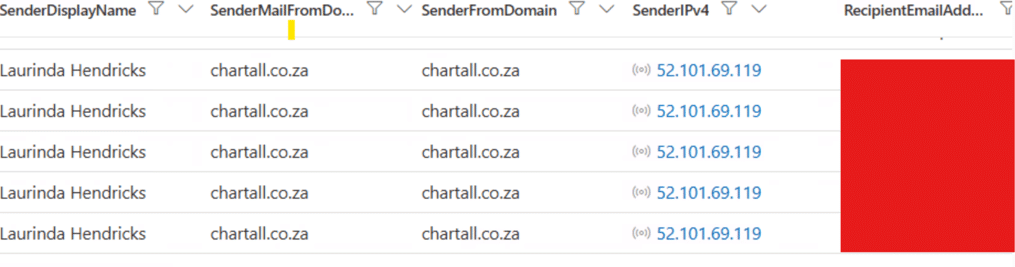
Figure 1: Mail telemetry showing the lure delivered to multiple recipients from a single compromised external sender.
The message originated from a compromised corporate mailbox belonging to an external organization and traversed legitimate Microsoft mail infrastructure. As a result, the delivery bypassed traditional sender reputation filters: the domain was established, the mail infrastructure was trusted, and header telemetry exhibited no standard anomalous indicators.
Both the embedded link and the PDF directed traffic to identical attacker-controlled infrastructure that presented a spoofed Adobe Acrobat Sign document portal requiring identity confirmation to unlock an “Important Update.pdf” document. It displayed a device code, a “Copy Code” button, and step-by-step instructions directing the victim to Microsoft’s official device login portal.
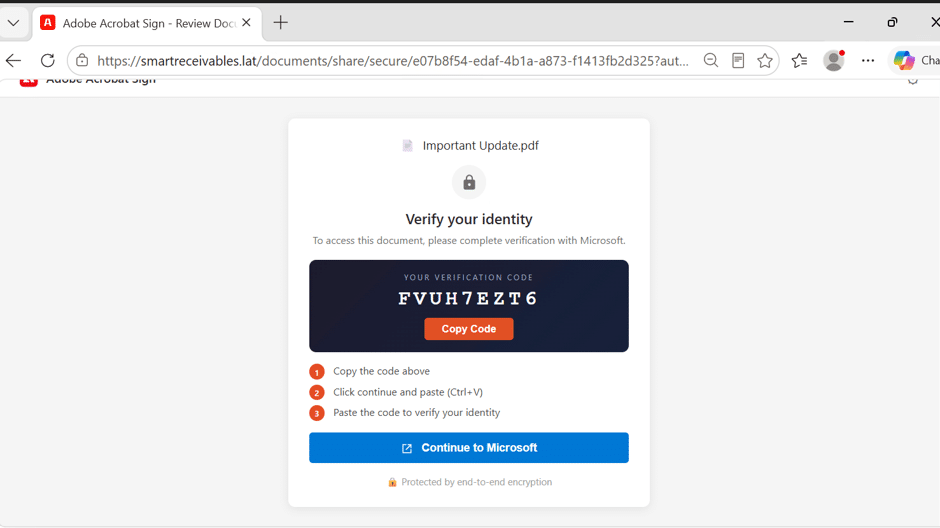
Figure 2: The lure page – fake document sign-in portal.
The attack unfolded across the following sequence:
- Initial Delivery and Decoy Interaction: A phishing email bearing both an embedded link and an invoice-themed PDF was delivered to several users across the organization. The landing page avoided standard credential-harvesting forms, malware, or fake login portals; instead, it presented a verification code and instructed the recipient to enter it to proceed.
- Legitimate Authentication and Token Acquisition: The first user navigated to Microsoft’s genuine verification endpoint, entered the provided code, and legitimately completed multi-factor authentication (MFA). By completing the device code flow, the user handed an active, authenticated session directly to the adversary.
- Tenant Persistence in Three Minutes: Just three minutes after opening the lure, the adversary leveraged the session to register an attacker-controlled device directly onto the tenant.
- The Detection Gap and Secondary Compromise: While automated alerting eventually flagged the initial victim’s compromise, it missed a second user who completed the identical authentication flow twenty-three minutes later. That second account remained compromised and unalerted for roughly seventy minutes.
While most recipients ignored the message, two completed the device code flow but only one of those actions triggered a detection alert. A campaign that reaches several mailboxes and converts two is not a failure from the attacker’s point of view, it only takes one session to establish a foothold, and in this case it only took minutes.
The First Compromise: Three Minutes to Persistence
| Time (IST) | Event |
| 13:54 | Phishing email delivered |
| 13:55 | User opens the link from the PDF attachment |
| 13:56 | Successful device code authentication |
| 13:57 | Attacker registers a new device in Entra ID |
| 14:15 | Automated alert raised |
| 14:45 | Session revoked, password reset |
| 15:34 | Unauthorised device removed |
The adversary achieved persistence in three minutes, and the automated alert triggered eighteen minutes later.
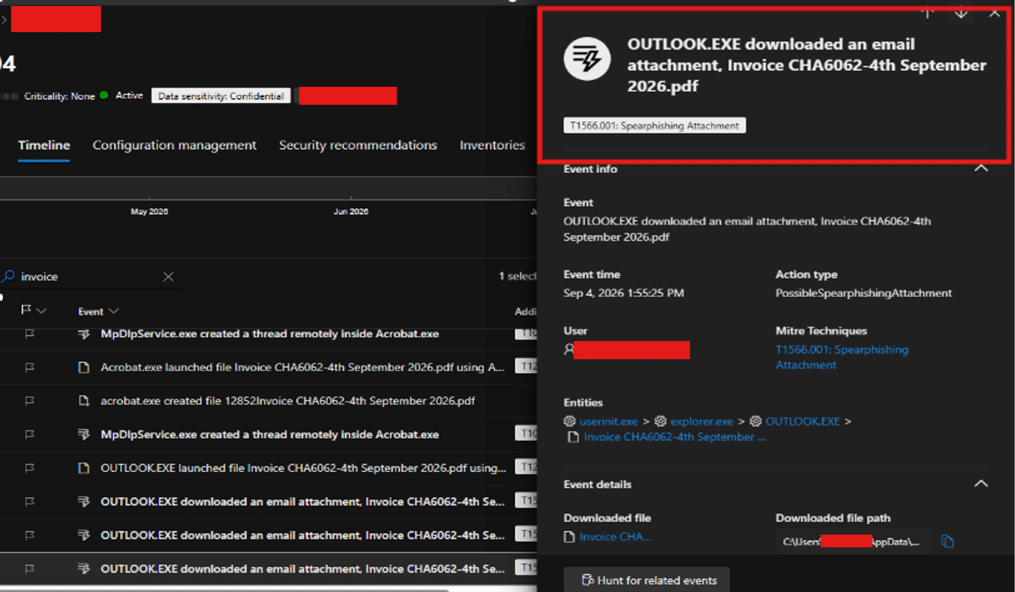
Figure 3: Mail telemetry showing the lure delivered to multiple recipients from a single compromised external sender.
Critically, the threat actor’s initial action post-token acquisition was not mailbox enumeration or data exfiltration—it was enrolling a rogue device into the tenant.
Why Device Registration Matters More Than the Session
A stolen OAuth session token eventually expires or can be invalidated. A registered device, by contrast, establishes a durable, identity-level foothold. This rogue endpoint survives a standard password reset, can satisfy device-based Conditional Access Policies, and provides a persistent, trusted route back into the environment under the guise of an enrolled asset. Security teams should treat every confirmed device code compromise as a device-registration incident until proven otherwise, making tenant device-list validation a mandatory step in triage.
The Second Compromise: The Detection Gap
| Time (IST) | Event |
| 13:54 | Phishing email delivered to the second recipient |
| 14:16 | User opens the malicious attachment |
| 14:19 | Successful device code authentication completed |
| 15:30 | Compromise surfaced via proactive threat hunting |
| 15:41 | Active sessions revoked |
No automated detection fired for the second account. The authentication concluded at 14:19 and remained unflagged until 15:30, when threat hunters investigating the primary compromise pivoted across the telemetry window to locate other device-code completions. This gap left the corporate mailbox exposed to seventy minutes of silent, unauthorized access.
Both intrusions traced back directly to a single adversary-controlled IP hosted on a commercial cloud infrastructure provider.
The Agent-Led Threat Hunt
Rather than closing the initial alert as a localized, single-identity event, hunters deployed our autonomous threat hunting agent across the tenant’s broader identity logs. This mirrors our endpoint investigation methodology: analysts establish the core hypothesis and bounding criteria, the hunting agent executes breadth-first correlation across the estate, and human operators validate findings.
The hunting hypothesis was framed around adversary infrastructure reuse: threat actors heavily recycle Virtual Private Servers (VPS), exit nodes, and proxy addresses across multiple targets within a single campaign before rotating assets. Even when subdomains, branding templates, or client user-agents mutate between delivery waves, backend egress points frequently stay static. An alert locked to one identity cannot perceive this multi-user pattern; a hunt structured around campaign mechanics can.
The hunt also delineated three critical populations that are routinely conflated during triage:
- The targeted group: All accounts that received the malicious email (sourced via mail gateway telemetry).
- The interacting group: Users who clicked through to the decoy portal (sourced via web proxy/DNS telemetry).
- The compromised group: Users who finalized authentication and satisfied the flow (sourced via identity logs).
Only the third cohort represents active compromise. Containment relies entirely on isolating this subset.
The agent ran ten correlated queries spanning identity and proxy datasets, hunting for campaign behaviors rather than the isolated alert artifact:
- Campaign-style device code authentication from a single source IP against multiple accounts
- Device code sign-ins directed at commonly abused first-party Application IDs
- Single device code sessions observed across multiple source IPs within narrow timeframes
- Temporal correlation between device code authentications and subsequent device registrations
- Web proxy and mail telemetry mapping additional recipients of the lure infrastructure
The first correlation delivered the critical breakthrough: a single external IP address responsible for successful device code authentications across multiple corporate accounts, across multiple sign-in events, all tied to the identical Application ID. One IP, two accounts, one coordinated campaign. This interaction remained invisible to per-user anomaly thresholds because each sign-in appeared structurally legitimate on an individual basis. The anomaly only becomes evident when correlated across multiple accounts.
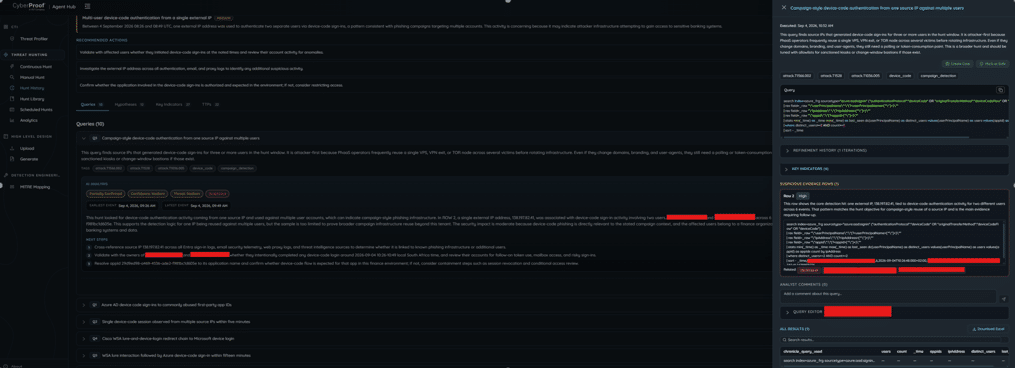
Figure 4: Agent-led hunt correlating multi-account sign-ins to a single attacker IP.
The agent delivered its findings with an actionable confidence score, marking the result as partially confirmed at medium confidence. This provided actionable justification for immediate containment, while clearly qualifying that the localized sample size could not yet confirm whether the hosting infrastructure extended beyond this specific tenant. Crucially, the agent supplied immediate analyst actions: validate sign-in intent with the users, cross-reference the external IP across mail and proxy records, and determine whether the requested application should ever utilize device code flows in this environment.
Distinguishing between actionable certainty and absolute mathematical proof allowed analysts to execute containment without delay. Threat Hunters were able to validate the second compromise against the malicious infrastructure and escalated for remediation. Sessions were revoked eleven minutes after the agent surfaced the finding.
The Mechanics of Device Code Abuse
Device code flow exists for a good reason. It exists to facilitate authentication on input-constrained devices (such as smart TV or other displays, CLI tools, and IoT devices). The target device displays a short verification string, prompting the user to visit an authentication URL on an alternate workstation or mobile device, input the code, and authenticate. Upon completion, tokens are issued back to the initiating device.
Adversaries weaponize this architecture by initiating the authorization flow externally and coercing the victim into completing it:
- Adversary Request: The attacker solicits a device code from Microsoft targeting a chosen client ID, typically a trusted first-party application like Microsoft Authentication Broker.
- Code Generation: Microsoft returns an authorization code along with the genuine verification URI (
[microsoft.com/devicelogin](https://microsoft.com/devicelogin]). - Lure Delivery: The attacker serves the code to the target under a plausible pretext—here, an invoice notification containing a link and a PDF pointing to a document-signing decoy.
- Victim Validation: The user navigates to the genuine Microsoft portal, enters the attacker’s device code, signs in, and satisfies MFA challenges.
- Token Issuance: Microsoft issues valid access and refresh tokens directly to the adversary’s waiting session.
Because the victim authenticates directly against Microsoft’s infrastructure, perimeter and endpoint controls frequently fail to intervene:
- Secure Email Gateways (SEGs): Authentication-phase URLs point to genuine Microsoft infrastructure, preventing reputation-based domain blocks.
- MFA Controls: MFA requirements are fulfilled, not bypassed; the victim explicitly approves the authentication prompt.
- Credential Guards: No usernames or passwords touch third-party adversary infrastructure, bypassing traditional credential-harvesting signatures.
- Conditional Access Policies (CAPs): Standard policies often fail to flag the device code flow unless access controls explicitly evaluate device health or restrict device code protocol grants.
In raw audit logs, the event presents as standard, successful MFA authentication by a valid user. Without dedicated correlation of protocol metadata, it blends in with everyday sign-in activity.
The Macro Landscape
This specific phishing campaign was not an isolated event. Across our client base, we confirmed five device code phishing intrusions during Q2 and Q3 of 2026, alongside a steady volume of prevented attempts. Comparing these two quarters against the prior six months represents a 400% increase in confirmed device code compromises.
The attack surface spans multiple verticals. While banking, financial services, and insurance (BFSI) bear the brunt of these campaigns, we have also remediated incidents across retail and automotive manufacturing sectors throughout EMEA between April and September 2026. Any organization running Microsoft 365 is a viable target, and the lures dynamically adjust to business-as-usual communications.
Industry metrics reinforce this surge:
- Huntress reported a 1,380% surge in device code phishing between H2 2025 and the first four months of 2026.
- CrowdStrike’s 2026 Threat Hunting Report noted a fifteenfold spike in H1 2026 compared to H2 2025.
- Push Security observed a 37.5x rise in device code phishing landing pages by April 2026.
- Microsoft tracked between 10 and 15 net-new campaigns emerging every 24 hours.
What Changed? While the abuse technique has existed since 2020 and saw select nation-state deployment in 2024, it historically remained niche due to the manual overhead of campaign generation. That constraint dissolved in February 2026 with the release of EvilTokens, a commercialized PhaaS toolkit sold on Telegram that streamlined device code phishing into an off-the-shelf subscription model. The technical barrier to entry fell away, and attack volumes scaled immediately.
Sekoia’s analysis details that EvilTokens relies on decoy pages mimicking Microsoft services or enterprise platforms (such as Adobe Acrobat, DocuSign, or SharePoint) paired with financial, meeting, or payroll pretexts. The decoys display an authentication code for the target to copy, directing them to finalize verification through Microsoft’s official portal.
That blueprint aligns precisely with this incident: an invoice lure, an Adobe Acrobat Sign decoy, a device code, and an immediate redirection to Microsoft’s genuine verification endpoint. However, broad reporting often overlooks post-compromise activity. This write-up details what follows token acquisition: tenant persistence established via device registration within three minutes, a second compromised identity missed by automated telemetry, and the hunt that uncovered it.
Detection Logic
The most reliable detection signals for identifying device code abuse include:
- Anomalous Device Code Usage: Flag any device code authentication that falls outside strictly sanctioned technical use cases (e.g., specific developer tools or headless kiosk setups). This single scoping rule filters the vast majority of malicious attempts.
- Abuse of First-Party Client IDs: Monitor authentication attempts using first-party Microsoft App IDs (such as Microsoft Authentication Broker) that are not authorized for headless workflows.
- Infrastructure & ASN Anomalies: Sign-in events originating from hosting facilities, VPS subnets, non-standard ASNs, or atypical geographic regions. Enterprise users rarely authenticate directly from cloud datacenters.
- Post-Authentication Device Enrolment: Any new Entra ID device registration occurring within minutes of a device code sign-in must be treated as a high-fidelity indicator of compromise (IoC).
- Session Origin Discrepancies: Time and network mismatches between the location where the device code was originally generated and where it was ultimately redeemed.
Hunting Queries
Microsoft Sentinel / Entra ID (KQL)
Unsanctioned Device Code Authentications:
SigninLogs
| where TimeGenerated > ago(30d)
| where AuthenticationProtocol =~ "deviceCode"
| where ResultType == 0
| where AppDisplayName !in~ ("Azure CLI", "Azure PowerShell",
                             "Microsoft Azure PowerShell")
| project TimeGenerated, UserPrincipalName, AppDisplayName, AppId,
          IPAddress, Location, UserAgent, ResultType
| sort by TimeGenerated desc
Device Registration Immediately Following Device Code Sign-In:
let deviceCodeSignins =
    SigninLogs
    | where TimeGenerated > ago(30d)
    | where AuthenticationProtocol =~ "deviceCode" and ResultType == 0
    | project SigninTime = TimeGenerated, UserPrincipalName, IPAddress,
              AppDisplayName;
deviceCodeSignins
| join kind=inner (
    AuditLogs
    | where TimeGenerated > ago(30d)
    | where OperationName has_any ("Add device", "Add registered device",
                                   "Register device")
    | extend UserPrincipalName = tostring(InitiatedBy.user.userPrincipalName)
    | project RegTime = TimeGenerated, UserPrincipalName, OperationName,
              TargetResources
) on UserPrincipalName
| where RegTime between (SigninTime .. (SigninTime + 30m))
| project SigninTime, RegTime, UserPrincipalName, IPAddress,
          AppDisplayName, OperationName
| sort by SigninTime desc
Splunk
Multi-User Device Code Activity from a Single Source IP:
index=<azure_signin_index> ("authenticationProtocol":"deviceCode"
    OR "originalTransferMethod":"deviceCodeFlow" OR "deviceCode")
| rex field=_raw "\"userPrincipalName\":\"(?<userPrincipalName>[^\"]+)\""
| rex field=_raw "\"ipAddress\":\"(?<ipAddress>[^\"]+)\""
| rex field=_raw "\"appId\":\"(?<appId>[^\"]+)\""
| stats min(_time) as _time max(_time) as last_seen
        dc(userPrincipalName) as distinct_users
        values(userPrincipalName) as users
        values(appId) as appIds count by ipAddress
| where distinct_users>=2 AND count>=2
| sort - _time
Note: Application exclusion lists must be tuned to your specific environment (rather than copy-pasting) to maintain high detection fidelity and minimize noise.
Incident Containment & Response
It is recommended that these response procedures follow this operational order:
- Revoke Active Sessions: Immediately terminate all active refresh tokens. A password reset alone does not invalidate existing OAuth sessions.
- Reset User Credentials: Execute an administrative password reset on the affected accounts.
- Remove Unauthorized Registered Devices: Audit and purge any newly registered Entra ID devices associated with the compromised identity to eliminate persistent footholds.
- Block Adversary Infrastructure: Ingest identified domains, hosting IPs, and sender addresses into mail gateway and web proxy blocklists.
- Hunt Horizontally for Campaign Infrastructure: Pivot across identity logs using the attacker’s egress IP and client details to identify secondary compromised accounts before concluding the incident.
- Inspect Persistence & Lateral Movement Artifacts: Audit mailbox rules, automated forwarding policies, and data access logs within the exposure window to verify that no exfiltration channels were established.
Architectural Hardening & Mitigation
- Enforce Conditional Access Restrictions: Restrict or outright block the device code grant via Microsoft Entra ID Conditional Access. Exempt only explicitly approved service identities, developer groups, or headless systems that require it. Restricting this flow breaks the attack chain at the protocol level, neutralizing even highly convincing decoys.
- Constrain Device Registration Privileges: Restrict standard users from registering personal devices in Entra ID, and implement dedicated alerting on all new registration events.
- Reduce Token Lifetimes: Shorten session and refresh token validity windows to restrict the duration of any intercepted access token.
- Targeted Security Awareness: Train users on the specific operational reality of device codes: legitimate corporate platforms will never prompt an employee to copy a code into a separate Microsoft login page to view a routine business document.
Indicators of Compromise (IoCs)
Client identifiers and compromised third-party sender details have been redacted.
| Type | Indicator |
| Delivery Mechanism | Invoice-themed PDF attachment relayed via compromised third-party tenant |
| File Hash (SHA-256) | 47AF963E2C451DBCD7E38D7BF3E1BC0A15775E4C45F9FC3590853B3262EB8B1C |
| Initial Redirect URL | hxxps://inv-mla190780rfp-08312067[.]onrender[.]com/ |
| Lure Landing Page | smartreceivables[.]lat |
| Adversary Source IP | 138.197[.]82[.]41 (Commercial hosting provider) |
| Persistence Mechanism | Unauthorized Entra ID device registration post-authentication |
| Targeted Application | Microsoft Authentication Broker (First-party client ID) |
MITRE ATT&CK Mapping
| Tactic | Technique ID & Name |
| Initial Access | T1566.001 – Phishing: Spearphishing Attachment |
| Credential Access | T1528 – Steal Application Access Token |
| Initial Access / Persistence | T1078.004 – Valid Accounts: Cloud Accounts |
| Persistence | T1098.005 – Account Manipulation: Device Registration |
| Defense Evasion | T1550.001 – Use Alternate Authentication Material: Application Access Token |
Conclusion
Device code phishing succeeds because it avoids breaking authentication—it borrows it. The target signs in via a genuine Microsoft endpoint, satisfies MFA, and hands an active token directly to the adversary. In this intrusion, that session translated into tenant persistence via rogue device enrollment within three minutes.
The most critical takeaway is the visibility gap. While one account triggered an alert, a second compromise proceeded undetected and would have remained active had the response focused solely on the alerted identity. The breakthrough came from asking a broader operational question: not merely “what did this user do,” but “where else has this adversary infrastructure touched our organization?”
Answering that question manually under active incident pressure is time- and resource-intensive. Offloading correlation to an autonomous threat hunting agent makes sweeping the entire estate practical during the containment window. Static alerts detect individual points of failure; proactive hunts expose the full campaign.
References
- CyberProof, The Dangerous Rise of Device Code Phishing in Financial Services (June 2026). https://www.cyberproof.com/blog/the-dangerous-rise-of-device-code-phishing-in-financial-services/
- CyberProof, How Tycoon 2FA is Transforming the Phishing Landscape (March 2026). https://www.cyberproof.com/blog/how-tycoon-2fa-is-transforming-the-phishing-landscape/
- Huntress, EvilTokens and the Rise of AI-Powered Phishing. https://www.huntress.com/resources/eviltokens-ai-powered-phishing-report
- CrowdStrike, 2026 Threat Hunting Report. https://www.crowdstrike.com/
- Push Security, Analyzing the rise in device code phishing attacks in 2026. https://pushsecurity.com/blog/device-code-phishing
- Sekoia, EvilTokens device code phishing kit analysis (March 2026).
- Proofpoint, Device Code Phishing is an Evolution in Identity Takeover (May 2026). https://www.proofpoint.com/us/blog/threat-insight/device-code-phishing-evolution-identity-takeover
- Microsoft Security, Storm-2372 device code phishing campaign analysis. https://www.microsoft.com/en-us/security/blog/2025/02/13/storm-2372-conducts-device-code-phishing-campaign/
- Microsoft Entra ID, Conditional access and authentication flows. https://learn.microsoft.com/en-us/entra/identity/conditional-access/
- MITRE ATT&CK. https://attack.mitre.org/
