







Contributors: Vishak Unnikrishnan Kavitha, Niranjan Jayanand
Executive Summary
Over the past two months, cybercriminals have increasingly abused Remote Monitoring and Management (RMM) tools in multi-stage attack campaigns. These attacks often begin with phishing emails disguised as holiday party invitations, overdue invoices, tax notices, Zoom meeting requests, or document signing notifications. While these lures appear harmless, their true intent is credential theft and unauthorized access. Recent public research released on November 19, 2025, highlighted this trend, noting that attackers frequently use seasonal lures such as “Party Invitation” or “December Holiday Party” to trick victims into engaging with malicious content.
In 2025, CyberProof researchers tracked similar ransomware actors exploiting unpatched tools and highlighted research findings of RMMs used in attacks, including:
- ConnectWise ScreenConnect Attacks (Part 1): Continued Surge in RMM Tool Abuse
- ConnectWise ScreenConnect Attacks (Part 2): IRS Themed Attacks
- A global MSP adopts CyberProof’s Advanced Threat Hunting for exposure reduction and resilience
While many phishing campaigns in late 2025 focused on holiday-themed lures, recent activity shows a pivot toward high-urgency financial themes. During the most recent attacks, though, threat actors are successfully bypassing traditional Endpoint Detection and Response (EDR) solutions, by masquerading as PayPal alerts.
CyberProof researchers studied these campaigns through 6 different incidents across our customer environments. This reporting details one particicular incident where attackers transitioned from targeting an employee’s personal PayPal account to establishing a corporate foothold through a multi-layered RMM strategyRecent investigations revealed attackers leveraging legitimate RMM tools such as LogMeIn Rescue and AnyDesk to gain persistence and control over victim systems. This trend underscores a growing risk – legitimate remote access software being weaponized for malicious purposes.
Please note: As always with our research and reporting, all affected customers were notified of threats immediately and any infections were remediated.
Incident Overview
On January 5, 2026, our Managed Detection and Response (MDR) team detected an attack targeting a user’s PayPal account, which later escalated to corporate access. The attack sequence included:
- Phishing Email: A fake PayPal alert created urgency.
- Social Engineering: Phone-based manipulation convinced the victim to install remote access software.
- RMM Deployment: Attackers installed LogMeIn Rescue, later switching to AnyDesk for redundancy.
- Persistence: A scheduled task and shortcut file with Gmail-style naming were created to maintain access.
Notably, no Endpoint Detection and Response (EDR) alerts were triggered. The attack was identified through proactive threat hunting queries focused on persistence indicators.
Phase 1: Social Engineering and Initial Access
The attack chain begins with a fraudulent PayPal alert designed to create immediate urgency. The victim is then engaged through phone-based social engineering, where the attacker masquerades as support personnel to gain trust.
During this interaction, the user is manipulated into downloading and running attacker-provided binaries. In the documented incident, the attacker first convinced the user to download a LogMeIn Rescue applet, later pivoting to an AnyDesk web-based remote session.
While triaging the incident with the CyberProofMDR team, we observed how the attacker cleverly convinced a user to establish an AnyDesk remote session via the web, as documented below:
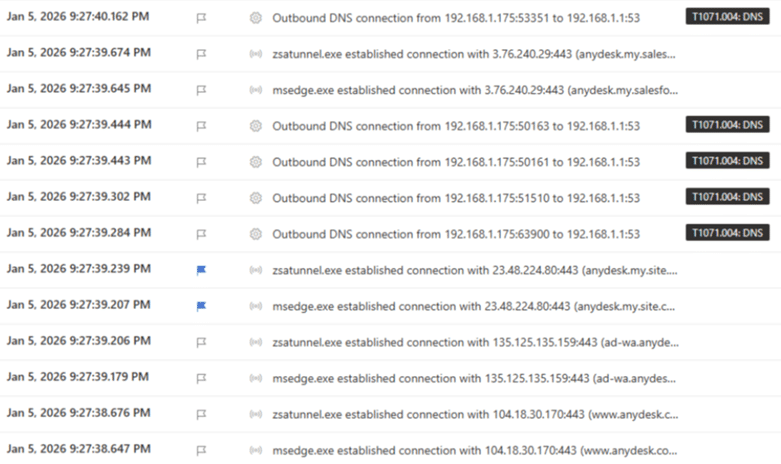
Fig 1: AnyDesk web session seen in the incident
Phase 2: Tool Redundancy
We can see how the user was tricked into downloading a binary named “Support-LogMeInRescue (3).exe” prior to AnyDesk[NJ1] .
Below shows the artifact seen:
- C:\Users\redacted\AppData\Local\LogMeIn Rescue Applet\LMIR09865001.tmp\
Other files included:
- LMI_Rescue.exe
- Lmi_Rescue_srv.exe
- LMI_RescueRC.exe
- ra64app.exe
- rahook.dll
- RescueWinRTLib.dll
- nvdaControllerClient32.dll
We also were able to confirm that a successful session was established, leaving the user vulnerable.
A notable trend in this campaign—and one mirrored in recent Broadcom research—is the use of one RMM to install another. This “redundancy” strategy serves two primary purposes:
- Detection Evasion: Continually changing the toolset reduces the likelihood of triggering signature-based alerts.
- License Management: Attackers may be cycling through trial licenses to avoid expiration and maintain access.
Phase 3: Establishing Persistence
Detection was achieved not through standard EDR alerts, but via specialized threat-hunting queries. Researchers identified a malicious persistence mechanism involving a scheduled task and a startup shortcut file.
- Artifact Location:
C:\Users\[redacted]\AppData\Roaming\Microsoft\Windows\Start Menu\Programs\ - LNK File Name:
shawaadi75gmail.com.lnk
The use of a Gmail-style naming convention for scheduled tasks was a deliberate attempt to blend in with legitimate system background processes. At the time of release, we are not able to confirm if the attacker’s email ID is anyway related to a known threat group. However, we estimate that this persistence could be intentional by the operator and not accidental behavior.
This campaign highlights the threat of malicious cyber activity associated with legitimate RMM software: after gaining access to the target network via phishing or other techniques, malicious cyber actors—from cybercriminals to nation-state sponsored APTs—are known to use legitimate RMM software as a backdoor for persistence and/or command and control (C2).
CyberProof researchers are in agreement with Broadcom researchers and their reporting, that often attackers believe that they are less likely to be detected if they continually change their toolset. By installing the additional RMMs in these instances they could be creating some level of redundancy. Another theory we are considering is that the attackers may be using trial licences for these RMM tools and regularly need to switch them regularly to avoid expiration.
Recommendations
To mitigate the risk of RMM-based infiltration, CyberProof recommends the following security posture enhancements:
- Maintain a robust asset inventory and hardware list [CPG 1.A].
- Implement best practices to block phishing emails.
- Maintain a clean, offline backup of the system to ensure encryption will not occur once reverted. Conduct a daily system backup on a separate, offline device, such as a flash drive or external hard drive. Remove the device from the computer after backup is complete [CPG 2.R].
- Do not expose remote services such as Remote Desktop Protocol (RDP) on the web. If these services must be exposed, apply appropriate compensating controls to prevent common forms of abuse and exploitation. Disable unnecessary OS applications and network protocols on internet-facing assets [CPG 2.W].
- Block both inbound and outbound connections on common RMM ports and protocols at the network perimeter.
- Implement a user training program and phishing exercises to raise awareness among users about the risks of visiting suspicious websites, clicking on suspicious links, and opening suspicious attachments. Reinforce the appropriate user response to phishing and spear phishing emails.
- Conduct a risk analysis for RMM software on the network. If RMM is required, ask third-party vendors what security controls are in place.
- Establish and maintain open communication channels with third-party vendors to stay informed about their patch management process.
- For software vendors, consider integrating a Software Bill of Materials (SBOM) into products to reduce the amount of time for vulnerability remediation.
- Please keep your EDR and Anti-Virus updated.
- Implement zero trust.
Conclusion
Cybercriminals are increasingly exploiting legitimate RMM tools to bypass traditional defenses. While the immediate motivation behind this campaign appears financial, the long-term risk is significant. Access gained through these RMM “backdoors” can be sold to Advanced Persistent Threat (APT) actors, leading to full corporate compromise or ransomware deployment.
Organizations must adopt layered security measures, proactive threat hunting, and strong vendor risk management to counter this evolving threat landscape. Learn more about CyberProof Advanced Threat Hunting capabilities to stay ahead of sophisticated RMM-based attacks and secure your corporate perimeter.
