







Contributors: Venkatesh Bolla, Niranjan Jayanand
Executive Summary
Recently, CyberProof Threat Hunters reviewed an MDR team alert involving targeted social engineering via Microsoft Teams and credential harvesting, followed by the abuse of legitimate remote access tools and the execution of built-in commands and techniques for reconnaissance, command and control (C2), and data exfiltration. During this incident, a single file was collected and analyzed, which appeared to be a Python-compiled infostealer. However, we were unable to fully determine the attacker’s intentions in this case.
This attack method is commonly used by human-operated ransomware groups such as Black Basta. Read our previous blog on Black Basta’s Advanced Phishing Strategies.
Technical Detail
New Teams Feature Overview
Microsoft Teams now allows users to send direct chat invitations to any email address, even if recipients aren’t part of a Teams tenant. Users can start chats with external participants who join as guests governed by Entra B2B Guest policies.
Incident Overview
On November 4, 2025, suspicious activity was observed in a customer environment through the Microsoft Teams “Chat with Anyone” feature, which allows direct messaging with external users via email addresses. An external user (mostafa.s@dhic.edu[.]eg) contacted the user in Teams, claiming to be from IT support. Multiple users received similar messages from this external user and were tricked into a remote support session using QuickAssist.exe.
Attack Timeline and TTPs
Step 1: A CyberProof MDR analyst alerted Threat Hunters of a suspicious Teams chat likely involved in remote management and command execution.
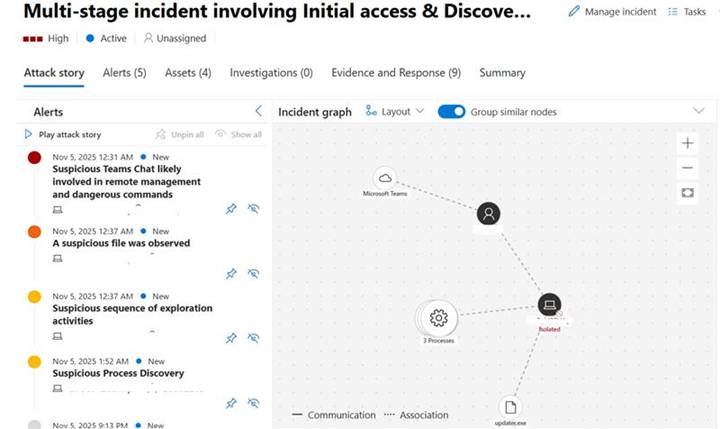
Fig. 1: Multi-stage Incident Graph
Below is the timeline view of the launch of ms-teams.exe and QuickAssist execution.
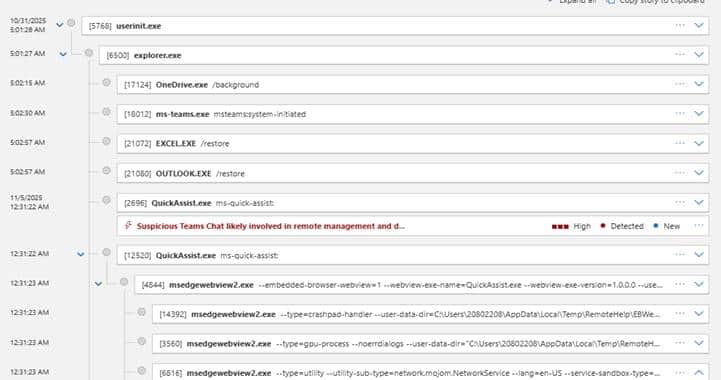
Fig. 2: Process Tree of ms-teams.exe and QuickAssist Execution
Step 2: Then an external attacker contacted a user over Teams on November 4, 2025 at 19:00:17Z, claiming to be from the organization’s IT support.
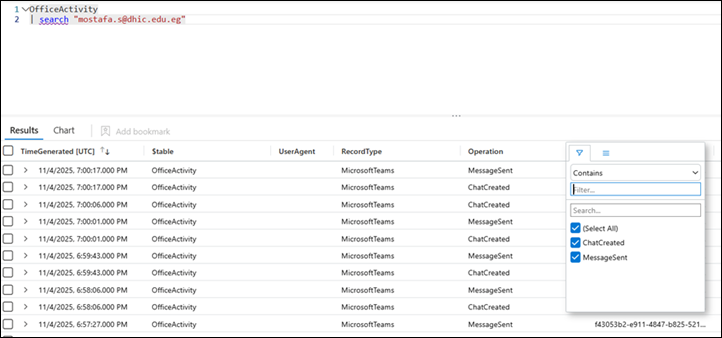
Fig. 3: Microsoft Teams Activity for External Email ID
The below image shows the Chat Created operation with the attacker email ID displaying as IT Support.
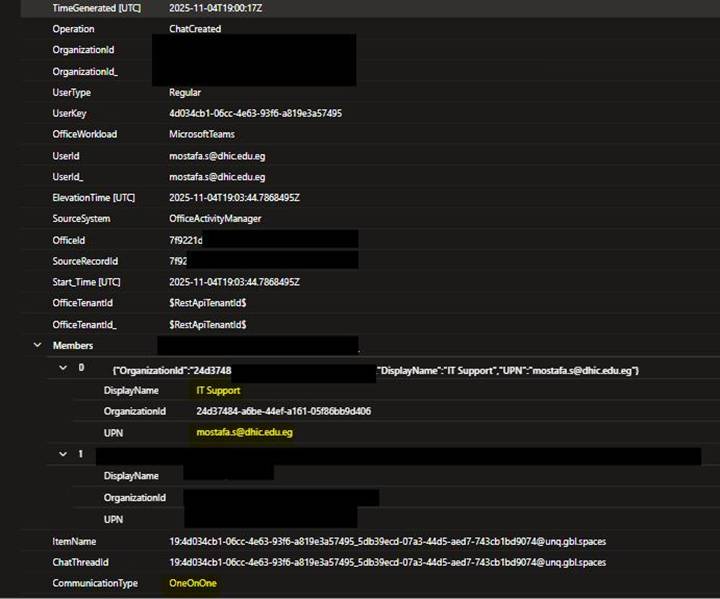
Fig. 4: Chat Creation Operation Details
Step 3: The attacker then contacted the user as IT Support on the very next day (Nov 5, 2025), started a Teams call, and tricked the user into initiating Quick Assist by sending a Phishing URL: “https[:]//spextronic[.]com/auth[.]php?update” where the user needed to provide login credentials to download Quick Assist.
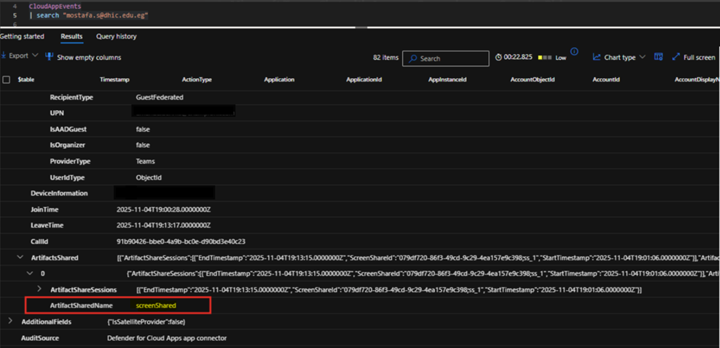
Fig. 5: Details of the “Screen shared” event over Teams.
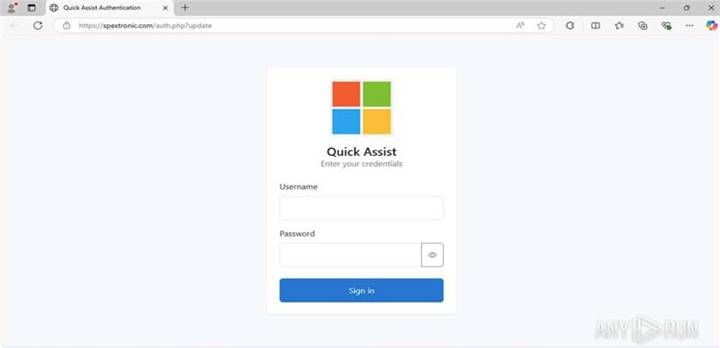
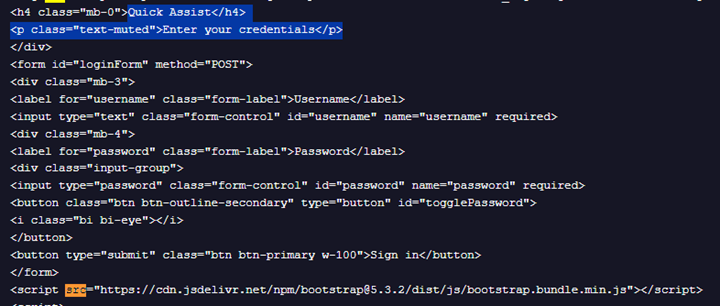
Fig. 6: Phishing Page for Quick Assist Authentication
Below is the source code snippet of this phishing page:
Step 4: Once the user credentials were provided, an infostealer named “updater.exe” [SHA256: 5c68baf77938b4aedef90403d6e8b19c9d24c8a9] was downloaded and executed. The file was signed by “WASSERMAN, LLC”.

Fig. 7: Download of updater.exe
Step 5: After this, the attacker executed commands for reconnaissance.
These are classic discovery TTPs used before privilege escalation or lateral movement:
- /c “nltest /dclist:” — lists domain controllers for AD compromise attempts
- /c “arp -a” — reveals local network mapping
- /c “route print” — exposes network routes
- /c “taskkill /PID 20184” — attempts process suppression
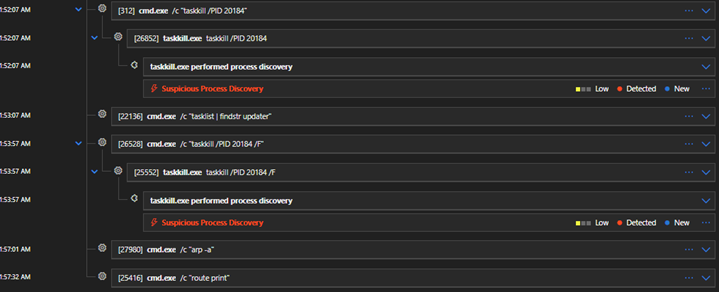
Fig. 8: Reconnaissance Activity by Attacker
After command execution, partial alerts were seen, and the attack was thwarted by the MDR analyst. The outbound connection was blocked, and the machine was isolated for threat containment.

Fig. 9: Threat Containment and Machine Isolation
Recommendations
According to Microsoft, admins can disable this feature through Teams Messaging Policies by running the following PowerShell command:
PowerShell
Set-CsTeamsMessagingPolicy -Identity "Global" -UseB2BInvitesToAddExternalUsers $false
This command sets the UseB2BInvitesToAddExternalUsers flag to $false, preventing users from inviting external participants via this feature. It can be applied globally or to specific messaging policies for granular control. If chat with unmanaged users is disallowed, users are no longer able to start chats with non-Microsoft 365 users using this feature. However, other external collaboration features (like channels) remain unaffected. Federation (external access) works independently of this feature.
Since it’s rollout the MS Teams feature, scheduled for early release in November 2025 and the full global rollout planned by January 2026, has raised concern on data exposure and compliance risks. We believe this could leave the door open for a potential escalations in more malware and phishing attacks.
Here’s are some additional items organizations and security analysts should keep a close watch for as attackers are likely to use impersonated audio & video calls more and increase Deepfake attacks:
- Block any unauthorized or unverified apps
- Whitelist approved remote access applications
- Vet all third-party technical service providers
- Implement Two-Step Verification and Zero Trust models
Indicators of Compromise
– SHA256: 5c68baf77938b4aedef90403d6e8b19c9d24c8a9
– Domain: spextronic[.]com
Threat Hunting Query
CyberProof Threat Researchers recommend using the publicly shared Threat Hunting Query to check if any Teams users in your tenant have chatted with external tenants or guest users using the new “Microsoft Teams – Chat with anyone via email address” feature.
Conclusion
The incident described above highlights the evolving tactics of threat actors leveraging legitimate collaboration platforms like Microsoft Teams for social engineering and credential theft. As attackers continue to exploit new features and bypass traditional security controls, proactive threat hunting becomes essential for organizational defense.
CyberProof’s Adanced Threat Hunting services combine advanced detection technologies with deep expertise to identify suspicious behaviors, investigate emerging attack patterns, and respond rapidly to incidents. By continuously monitoring for signs of compromise and adapting to the latest adversary techniques, CyberProof helps organizations stay ahead of threats, minimize risk, and strengthen their overall security posture.
