









Contributors: Niranjan Jayanand, Veena Sagar, Karthik Joseph, Archana Manoharan
Executive Summary
CyberProof MDR analysts and Threat Researchers have identified a significant surge in PXA Stealer activity targeting global financial institutions during Q1 2026. These campaigns primarily leverage phishing emails containing malicious URLs that trigger the download of compromised ZIP attachments. Threat actors have demonstrated high levels of adaptability, utilizing diverse lures ranging from curriculum vitae and Adobe Photoshop installers to tax forms and legal documentation. This opportunistic approach highlights the attackers’ ability to target a broad spectrum of victims. Following the 2025 takedowns of major infostealers such as Lumma, Rhadamanthys, and RedLine, CyberProof observes that PXA Stealer activity has filled the resulting vacuum, seeing an estimated growth of 8-10%.
This campaign investigated by CyberProof researchers is slightly different from the previous publicly reported research on PXA Stealers from August 2025. This article provides a detailed technical analysis of a PXA Stealer attack and its stages and a cluster using BOT_ID – “Verymuchxbot”, mapping out the entire kill chain from the initial phishing email to data exfiltration.
CyberProof researchers share this data publicly to inform the cybersecurity community, enable other organizations to defend against similar attacks, and contribute to the collective knowledge necessary to combat evolving cyber threats.
Technical Details
PXA Stealers help attackers steal browser data, passwords, crypto wallet information and more, and later pass them through Telegram channels. The kill chain reviewed looked very similar to the previously published research, but some differences became apparent to our research team after some inverstigation.
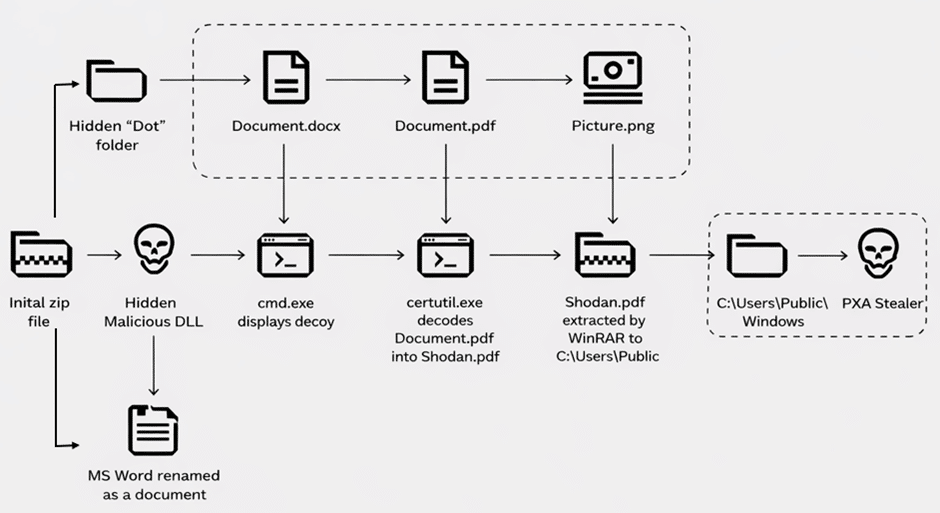
Fig. 1: Kill Chain of investigated PXA Stealer incident
During our investigation into an incident, we saw that a user was tricked into downloading a zip archive file by the name of Pumaproject.zip from downloadtheproject [.] xyz.

Fig. 2: User tricked to download malicious archive
When the user executed Document.docx.exe the next stage of attack is launched, unpacking python interpreter, python libraries and scripts.

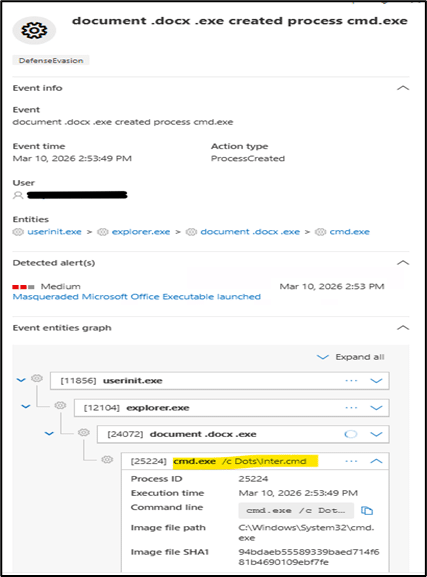
Fig. 3: This in turn executed inter.cmd from the hidden directory
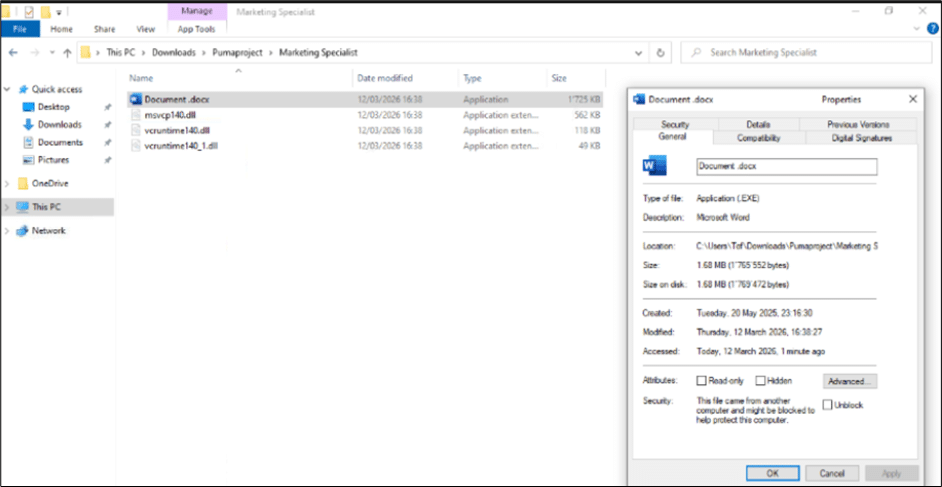
Fig. 4: Microsoft document used for side loading next stage payload. This kicks off the next stage of the multi-stage attack
Below we can see the Word document launching a benign document called Document.docx, and a series of LOLBins and file operations by the attacker.
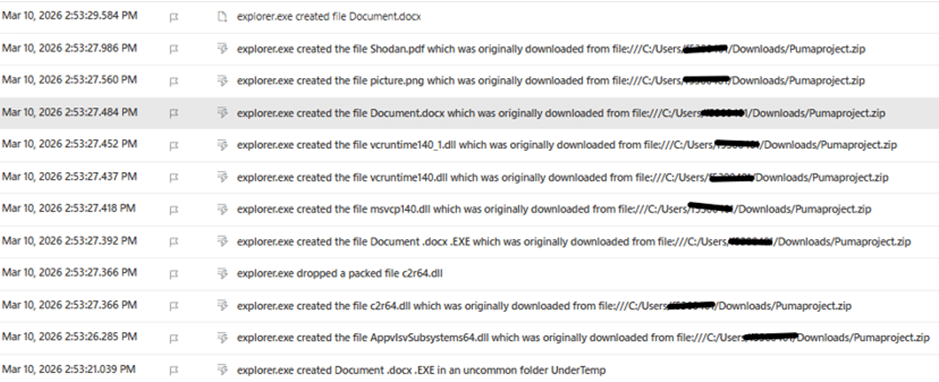
Fig. 5: PXA Stealer component files extracted followed by a hidden folder creation by the name of ‘Dots’
File inside the hidden directory which was named “Dots” is shown below:
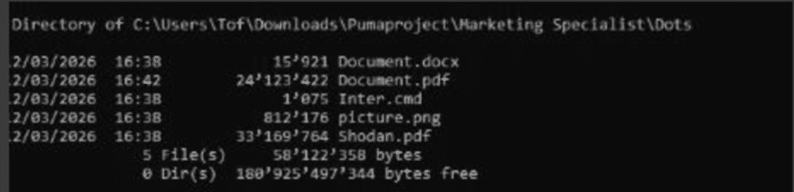
Fig. 6: Creation of files inside “Dots” folder
Some TTPs that remain the same except change in the hidden folder name are:
1.) Certutil is used to decode a file from the “Dots“ folder into a new encrypted zip archive that is deceptively named with a PDF file extension, Shodan.pdf.
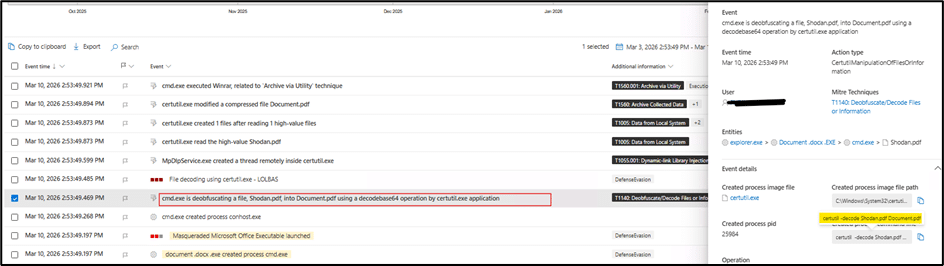
Fig. 7: Certutil.exe deobfuscates content from Shodan.pdf
2.) Legitimate WinRar executable in the “Dots“ folder renamed picture.png is used to unpack the archive.
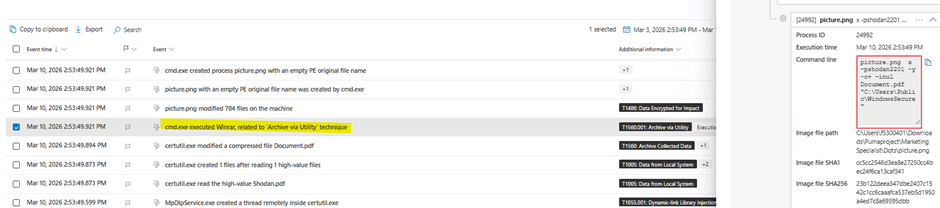
Fig. 8: Winrar disguised as picture.png unpacks the archive
3.) The second archive contains a portable Windows Python interpreter, several Python libraries, and a malicious Python script. The Python interpreter is renamed to svchost.exe and launches a heavily obfuscated Python script, again disguised as images.png, followed by the $BOT_ID argument.
Picture.png was unpacked with the password “shodan2201” and stored to a new directory “C:\Users\Public\WindowsSecure”.
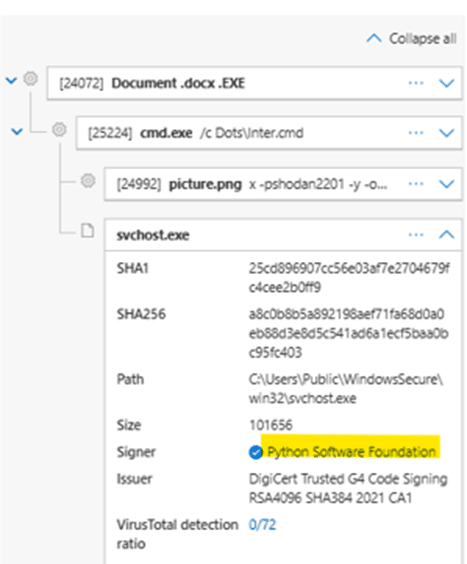
Fig. 9: Usage of password “shodan2201” to extract other files
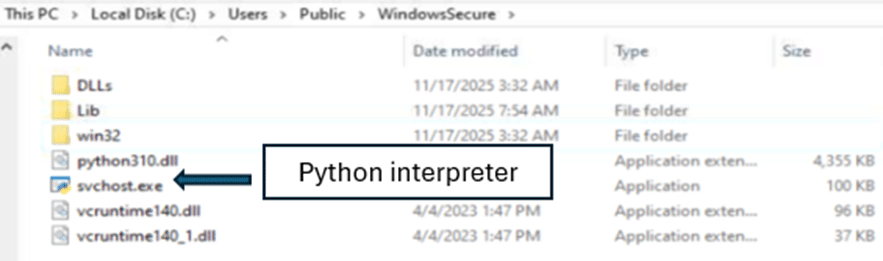
Fig. 10: Dropping Python Interpreter disguised as svchost.exe
File name: svchost.exe
SHA256: a8c0b8b5a892198aef71fa68d0a0eb88d3e8d5c541ad6a1ecf5baa0bc95fc403
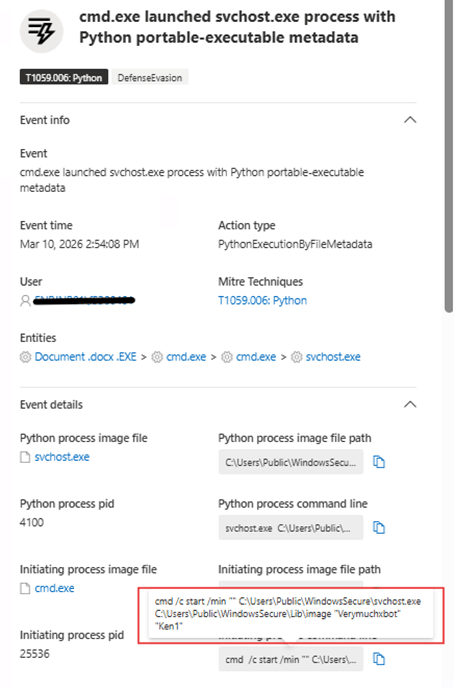
Fig. 11 : The Python interpreter is renamed
As shown above, the Python interpreter is renamed to svchost.exe and launches a heavily obfuscated Python script again – with a reference to likely $BOT_ID value “Verymuchxbot” or “Ken1”. The PXA Stealer payload is then finally injected into browsers to target user credentials and crypto wallets, and to intercecpt targeted data when specific websites are visited.
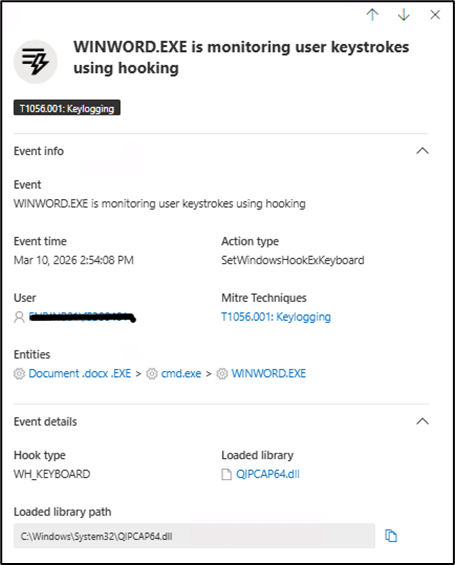
Fig. 12: PXA Stealer hooks to steal user data
The stolen data is later exfiltrated through Telegram by the PXA Stealer as shown below.
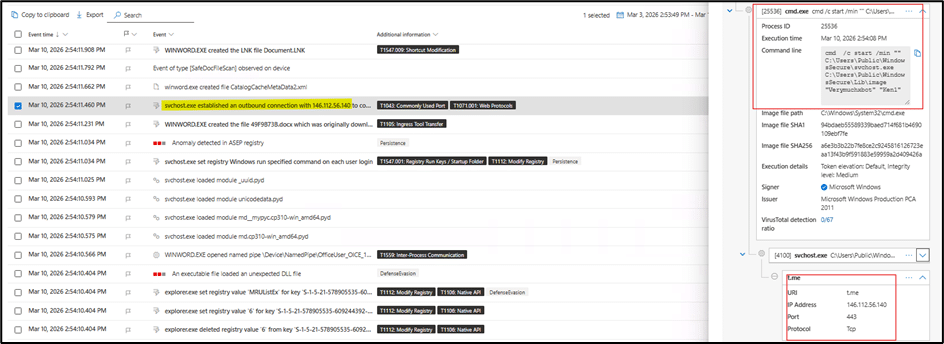
Fig. 13 : Data exfiltration through Telegram (t.me)
The PXA Stealer achieves persistence by adding a value registry entry.
Recommendations
Security teams should be vigilant for the specific indicators and behaviors detailed above to detect and mitigate this attack.
Here’s what to look for:
Initial Access and Delivery
- Malicious Attachments: Watch for emails with suspicious URLs and RAR/zip attachments, especially those with suspicious file names related to invoices, bills, payments, etc.
- VBE/VBS/JS File Execution: Monitor for the execution of VBScript (.vbs), VBE (.vbe), or JavaScript (.js) files particularly if they are launched from temporary folders or Outlook’s content folder.
Execution and Persistence
- Process Injection: Review EDR alerts related to process injection which is typical in the case of infostealers.
- Suspicious Outbound Connections: Block outbound connections to suspicious TLDs like .shop, .xyz, info, .net etc. These are typically seen in infostealer campaigns. We advise you to check for the source file context that leads to such outbound connections.
Data Exfiltration
- Credential Access: Review traffic to third party cloud sources or applications like Telegram, Signal, etc.
- Stay Ahead: Keep your CTI feeds and hunting queries updated to stay ahead of commodity malware attacks.
Threat Hunting Query

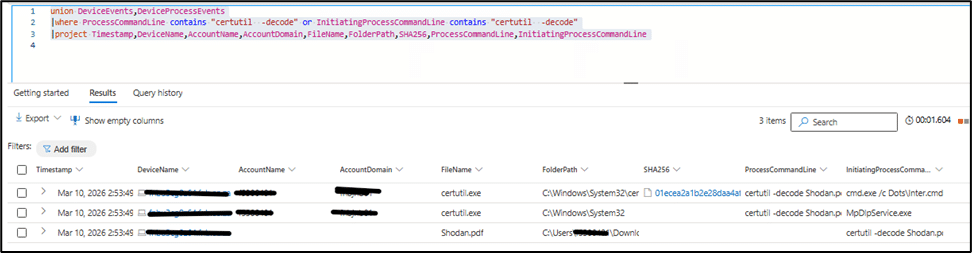
Fig. 14: Hunting query
VirusTotal Hunt Link
- Generic PXA Stealer VT hunting query: https://www.virustotal.com/gui/search?query=behavior%3A%22certutil+-decode%22+and+behavior%3A%22.pdf%22&type=files .xyz/Marketing-Puma!.zip[ES1]
- VT hunting query specific to this bot ID: https://www.virustotal.com/gui/search?query=behavior%3A%22Verymuchxbot%22&type=files
Indicators of Compromise
- File name: picture.png
- SHA256:23b122deea347dbe2407c1542c1cc6caaafca537eb5d1950a4ed7c8a69395dbb
- File Name: Document.docx
- SHA256:d30a4d0249b5417af02a4e7ffb5b456efd8cd5eb8da6532329ae071f643e5079
- FileName:c2r64.dll
- SHA256: 10955134b4e8dc41b2a116ab41d17b0ef0985bea99bdc5f0e5a11a07728905ec
- FileName:Pumaproject.zip
- SHA256: 100a7674ece92dae0dc0bfde15dfb524939a8dd0c295ff2e232895a07e21342f
- File Name: Shodan.pdf
- SHA256: 8de1c5a66deab8bd4f59b2801a66f503f087345ccb0598c5ca8185f1edb2092b
- FileName: Inter.cmd
Additional Indicators of Compromise
- SHA256: e1f6c80aae41feed9acfc62f1e1d83077ce6fda4bed56ffb448fe132a1c97afe
- 2255735d78b9ca0a20cbd2834876f4d1
- 7d68cfe4d7a83608490e6c3c8291ec9b
- 79471f93e15e04e6b7879a09de79d35b
- 0a5b50ca9beb5b740fdae5d783d5616d
- 61a163ae3cac1255c852a37c675edd5d
- 696c710f62e3a7f7c618c4733d67cc13
- 47b4c3dd3bc58037de31f3ee218d4ea1
- 6b6ee7e492e4c573381393dedbfec94d
- 386981b3cd77df33b60cd9b9d93a7812
- edee9e57699eea7371234acd40a34cac
- a534676c0dcf8d63eb1f7cbcd0bd5f35
- 0f1939d88e38cc825dfe5c50926344d6
- 6f5a040c83d490e30ea9b242c962d179
- 57ee3e3e7b106727b77ce98bf80c0e1b
- 3324c1c827428a212e2c9898d082037e
- 4b14ef9a1a69b3d39a8dda04e1d119bf
- 0c19f07cec233481e8efcf722f2b29fd
- 5991a68b994e76d48212b098ac599560
- fd50bc23272f3704762218ba43ce068b
- 00d68afd8a75ce8c194ab3bb4c64c152
- d240282856829133ec8f5ddd712fb49c
- 88528f1c4df15e1d4c92d71fe1223761
- 5d7d338c4cdd706a01de1ec32a08c5f4
- 690dcef7d7e265096010b276649fb529
- fd5fd153bded23ffac1a4dd2bbb38c78
- d85b44735555d96c6c763c4d466e074f
IPs
- 146.112.56.140
- 151.243.109.125
- https://downloadtheproject.xyz/Pumaproject.zip
- https://downloadtheproject.xyz/Puma-job.zip
- https://downloadtheproject.xyz/Marketing-Puma!.zip
Conclusion
This in-depth analysis of the PXA Stealer attack methodology provides a critical look into the evolving tactics of cybercriminals. By detailing the malware’s sophisticated techniques – from its initial delivery via malicious RAR attachments to its use of DLL sideloading, injection , LOLBin abuse and data exfiltration – we hope to equip organizations with the knowledge needed to strengthen their defenses.
Sharing these insights, including the Indicators of Compromise and hunting queries listed below, is a vital step in fostering a more resilient and collaborative cybersecurity community, enabling us all to better anticipate and neutralize future threats.
